
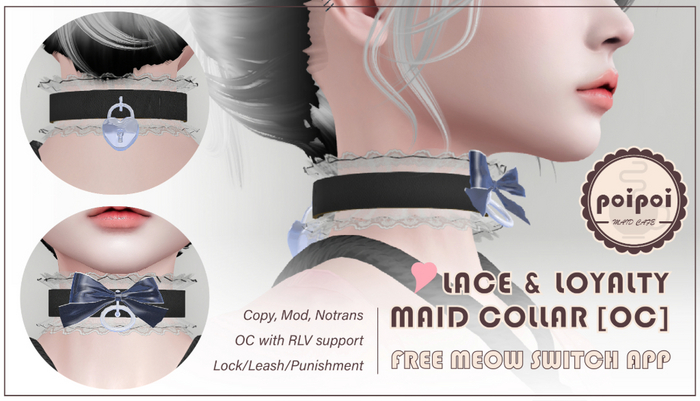
Lace & Loyalty Maid Collar
An OpenCollar maid collar with a lock you can see
The Lace & Loyalty Maid Collar pairs an elegant, lace-detailed original mesh with the full OpenCollar 8.4 feature set. Locking the collar snaps a realistic lock mesh into place so everyone can see exactly who belongs to whom. Copy and Modify throughout.
- Powered by OpenCollar 8.4
- Built on the full OpenCollar 8.4 script set: every advanced feature OC users know and love, ready for existing OC workflows and accessories.
- Lockable, Visibly
- A realistic lock mesh appears when the collar is locked and disappears when it opens; the state of things is readable at a glance, in-world, with no hovertext required.
- Lace-Inspired Original Mesh
- 100% original mesh with intricate lace-inspired detailing and materials that shimmer under any light. Copy and Modify permissions for easy personalization.
Changelogv1.2.02 updates — tap to expand
1.2.0
- Upgraded to OpenCollar 8.4
- New user guides
1.0.0
- Initial release
How it works
Getting Started
The package holds four versions of the collar plus two loose Meow Switch scripts:
| Item | What it is |
|---|---|
[OC] |
OpenCollar 8.4 with the English Meow Switch |
[OC] [CN] |
OpenCollar 8.4 with the Chinese Meow Switch |
[OC Only] |
OpenCollar 8.4 without the Meow Switch |
[Mesh Only] |
The collar mesh without scripts |
oc_meow / oc_meow_cn |
The Meow Switch scripts (English / Chinese). Drop one into a collar's contents to add the Meow Switch to it |
- Unpack: rez the package on the ground and touch it. A folder ending in
// Unpackedis added to your inventory. - Wear one version of the collar: in your inventory, right-click → Attach.
- Open the menu by:
- Touching the collar, or
- Saying
<prefix>menuin public chat or on channel 1.
The prefix is the first two letters of your account name in lowercase. If your name is "Poi Example", your command is pomenu. Your prefix and channel are shown under Help/About.
Use only one collar with OpenCollar scripts at a time. Two OpenCollar collars worn together conflict with each other.
Locking and the Meow Switch need an RLV-enabled viewer (such as Firestorm or Catznip). The menus themselves work on any viewer, but without RLV the collar cannot stop itself from being removed.
Features
Lock / Unlock
- Touch
Lock. The box in front of it is filled when the collar is locked. - A locked collar shows its lock mesh and cannot be removed. Touch
Lockagain to unlock; the lock mesh disappears.
Apps
| App | What it does |
|---|---|
Bell |
Ring sound while moving. ON turns it on, SHOW shows the bell, Vol + / Vol - set the volume, Next Sound changes the sound |
Titler |
Floating text above the head: Set Title, Color, UP, DOWN, Show |
Themes |
Apply or save a look for the collar |
Timer |
Timed locking and unlocking |
Detach |
Pick one of the wearer's attachments to remove |
Capture |
The OpenCollar capture app |
Label |
Text label for collars with a label panel. No visible effect on this collar |
Pet Speech
Meow Switch
Available in the [OC] and [OC] [CN] versions. In Apps, touch MewSW (the Chinese version shows 喵喵开关) to turn it on. Touch it again (shown filled) to turn it off.
- Everything the wearer says in public chat is shown to others as meows, with cat sounds. The wearer still sees their own real words.
- One character plays a short meow, a normal sentence plays the normal meow, and a sentence ending with
!plays an angry meow. - Other people wearing the Meow Switch can read the real words.
- While it is on, the wearer cannot shout and cannot send IMs.
- Whoever turned it on can turn it off, and so can anyone with higher access. The wearer's safeword also turns it off.
To add the Meow Switch to the [OC Only] collar, drop oc_meow (English) or oc_meow_cn (Chinese) into the collar's contents.
Leash
Open Leash in the main menu.
| Button | Action |
|---|---|
Length |
Set the leash length |
Follow / Anchor / Pass |
Leash the wearer to a person, an object, or hand the leash to someone else |
Give Holder |
Give out a leash holder |
Configure |
Change how the leash looks and behaves |
Configure options: color, size, weight, shine, Chain or Silk style, turn (face the leasher), LSL Turn (the same without RLV, needs a recent viewer), strict mode, and Invisible.
Binding & Poses
Open Animations in the main menu.
| Button | Action |
|---|---|
Pose |
List the poses. Pick one to play it. STOP ends it. The arrows raise or lower the height for the current pose |
Couples |
Couple animations with a nearby partner. TIME sets how long they play. Auto Acc. accepts invitations from owners and trusted users |
AnimLock |
Stops the wearer from changing or stopping poses |
Posture / StandOffset |
Adjust how the wearer stands |
RLV Restrictions
Open RLV in the main menu.
| Button | Action |
|---|---|
Restrictions |
Ready-made presets (Stray, Inventory, Dress, Hear, Talk, Touch and more). Touch a preset to turn it on or off. LIST PRESETS explains each one |
Exceptions / Force Sit / Folders |
Finer control over viewer behavior |
Relay |
Lets objects in the world send restrictions to the wearer. Set who the relay trusts, or turn it off |
CLEAR ALL |
Remove all restrictions |
Access Control
Open Access in the main menu.
| Button | Action |
|---|---|
+ Owner / - Owner |
Add or remove an owner. Owners have full control |
+ Trust / - Trust |
Add or remove a trusted user. Trusted users have limited control |
+ Block / - Block |
Add or remove a blocked user. Blocked users have no access |
Group |
Members of the wearer's current group can use the collar |
Public |
Anyone nearby can use the collar |
Wearer Trust |
Lets an owned wearer add and remove trusted users |
Access List |
Print who has access |
Runaway |
The wearer removes all owners, trusted and blocked people. An owner can disable it, with the wearer's agreement |
A collar without an owner is fully controlled by its wearer. The Owner, Trusted and Blocked lists share a limit of 28 people in total.
Settings
Open Settings in the main menu.
| Button | Action |
|---|---|
Hide / AllowHiding |
Hide or show the collar / allow it to be hidden |
Resize |
Resize the collar to fit |
Listen 0 |
Whether the collar hears commands in public chat. Turn it off to use only channel 1 |
Limit Range |
Ignore touches from people who are far away |
Print |
List the current settings in chat |
Load |
Reload settings from the settings notecard |
EDITOR |
Edit settings by hand |
Fix Menus |
Use it if menu buttons are missing |
Addon.. |
Manage connected add-ons |
The default safeword is RED. Say it in public chat to release the restrictions. It is shown under Help/About.