
Script Pack for Straitjackets
Script-only: adds the full restraint system to any jacket
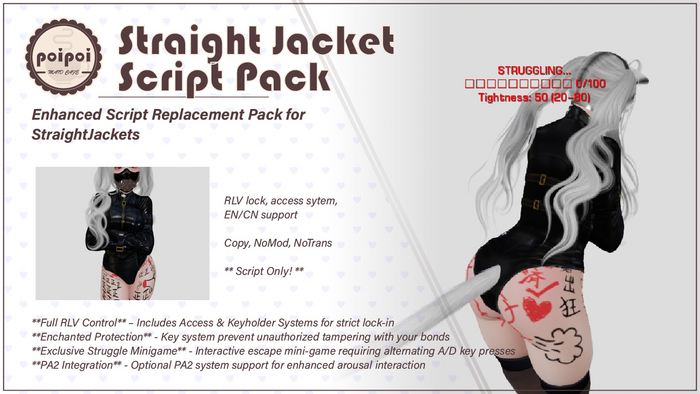
This is script only: the straitjacket is not included. It works with any brand of jacket: rez both, link them, take it back, and wear. From then on the jacket binds, locks, tightens, and fights back, a full POI restraint system wrapped in the mesh you already love. Full English and Chinese menus.
- Bring Your Own Jacket
- Not another straitjacket, an upgrade for the one you already own. Link the transparent script pack into any brand of jacket once, and it becomes a fully interactive POI restraint. Arm-binding and struggle animations are included, so no external animations are needed.
- Struggle Mini-Game
- Escape is earned, not typed: alternate the A and D keys to build progress toward 100 while it decays against you. The tighter the straps, the faster it slips away. Random constriction events and collisions with furniture or walls knock you back mid-fight, and a locked jacket stays on even at 100%.
- Bind, Tighten, Lock
- Bind with immersive bilingual descriptions, then let others tighten or loosen the straps: every notch of tightness changes how hard escape will be. Lock the buckles and hand the keys to a controller: from then on, only the key holder decides when it comes off.
- Timed Lock
- Set the timer and the jacket releases itself when the clock runs out: no mercy, no early outs for the wearer. Presets from minutes to hours, with the remaining time shown in the timer menu.
- Access Control & RLV
- Key holder, up to 5 trusted users, public access, and a self-access switch for true helplessness: turn it off and even you can't reach the controls. Locking is enforced over RLV (a viewer like Firestorm or Catznip) with an optional restrictions menu and a clean, automatic release.
- Auto-Struggle & Config
- Hands-free scene? Auto-Struggle builds progress on its own while the jacket fights back. Everything (progress per keystroke, decay, tightness range) is tunable in the Straitjacket.Config notecard, with floating-text progress and interference messages you can toggle.
How it works
Getting Started
A transparent script-only upgrade that gives any straitjacket a full interactive restraint system: binding, tightening, locking, a struggle mini-game, and RLV enforcement. Arm-binding and struggle animations are built in, no external animations required.
Installation
You need: a straitjacket (any brand) and the script pack.
- Rez your straitjacket on the ground.
- Rez the script pack next to it. The pack is transparent, press Ctrl+Shift+T if you can't see it.
- Click the script pack first, then hold Shift and click the straitjacket (the jacket becomes the root).
- Press Ctrl+L to link them.
- Right-click the linked object → Take.
- Add the combined jacket from inventory to your Avatar Center attachment point and grant the requested permissions.
- Touch the straitjacket to open the main control menu.
Locking and the RLV menu require an RLV-enabled viewer (e.g. Firestorm, Catznip). Animation and control permissions must be granted when prompted.
Binding & Poses
- Built-in arm-binding animations come with the pack: crossed and restrained automatically while bound, no external animations needed.
- Struggle animations play dynamically during escape attempts, and are maintained automatically without refresh rituals.
- Bind and release come with immersive descriptions in both English and Chinese.
Struggle Mini-Game
The heart of the pack: escape is a fight, not a command.
- While bound, open Struggle → Start Struggle.
- Alternate the A and D keys rapidly; every successful alternation builds progress toward 100.
- Progress decays over time; the decay rate scales with tightness. Higher tightness = faster decay = harder escape.
- Reach 100 and the binding releases, unless the jacket is locked: locked means locked, struggle all you want.
| Mechanic | Effect |
|---|---|
| Progress bar | Live floating text, 0–100, color-coded |
| Tightness | Adjustable 20–80 range; set by others via Tighten/Loosen |
| Interference events | Random constriction mid-struggle cuts your progress |
| Collision detection | Bumping into objects while struggling sets you back |
| Auto-Struggle | Progress builds automatically, hands-free scenes |
| Movement | Movement is disabled while actively struggling |
Auto-Struggle runs the same fight without key presses: watch the bar climb, slip, and climb again while interference events do their worst.
Lock & Key Holder
- Lock secures the buckles; Unlock releases them.
- Take Keys: claim key-holder control. From then on only the key holder can unlock the jacket. Return Keys gives that control back.
- While locked, the jacket cannot be removed, even at 100% struggle progress, and RLV detach-prevention keeps it on.
Timer
Open Timer ▸ from the main menu.
- Pick a duration from the presets, then Start / Stop.
- When the clock runs out, the jacket unlocks automatically: the wearer's only guaranteed way out.
- Remaining time is shown in the timer menu.
Access Control
Open Access ▸. Hierarchy: Key Holder → Trusted (up to 5) → Self → Public.
| Setting | Controls |
|---|---|
| Key Holder | One controller with exclusive unlock rights |
| Trust (up to 5) | Can control the device, including tightness and timer |
☑/☐ Self Access |
The wearer's own control, turn it off for true helplessness |
☑/☐ Public |
Let anyone nearby interact with the jacket |
RLV Restrictions
- Locking automatically prevents removal via the viewer (RLV detach prevention).
- The RLV ▸ menu adds optional configurable restrictions on top of the lock.
- Everything is cleared automatically on unlock: a clean release, every time.
Requirements: an RLV-enabled viewer (e.g. Firestorm, Catznip) for locking and the restrictions menu.
Settings
Open Settings ▸ from the main menu.
| Option | Effect |
|---|---|
☑/☐ Floating Text |
Show / hide the struggle progress display |
☑/☐ Interference Messages |
Show / hide struggle interruption text |
中文 / EN |
Full bilingual menus |
Straitjacket.Config notecard
Edit this notecard inside the jacket to tune the fight:
| Parameter | Range | Default | Meaning |
|---|---|---|---|
struggle_base_boost |
0.5–3.0 | 3.0 | Progress per successful A/D alternation |
decay_multiplier |
0.01–0.05 | 0.05 | Decay rate multiplier: decay scales with tightness |
auto_struggle_rate |
0.1–2.0 | 1.0 | Auto-Struggle progress per tick |
min_tightness |
10–50 | 20 | Lowest allowed tightness |
max_tightness |
60–100 | 80 | Highest allowed tightness |
default_tightness |
min–max | 50 | Starting tightness |