
Poi's Soundbox
Music player: upload and play, no stream URL needed
Poi's Soundbox brings your own soundtrack into Second Life the simple way: upload your audio, drop it in, touch, play. It works as a rezzed boombox or a worn attachment, remembers where you were, and never needs a stream URL. Build one flat playlist or whole albums, the choice is yours.
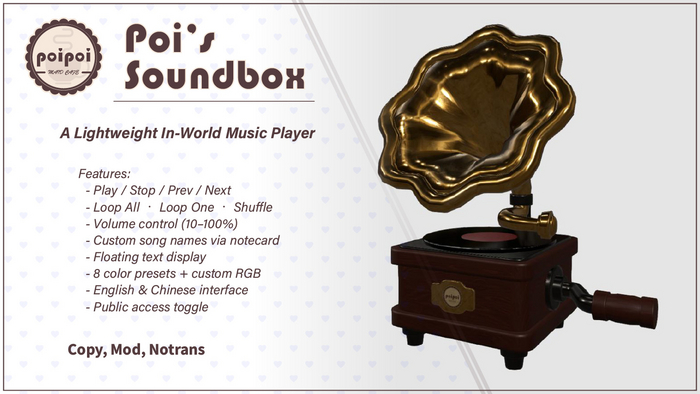
- Play Your Own Music Anywhere
- A lightweight music player that plays uploaded sound clips straight from its inventory: no media URL, no parcel stream, no setup. Rez it as decor or wear it as an attachment and press Play.
- Real Playback Control
- Play, Stop, skip forward and back, pick any song from a paginated list, and choose Loop All, Loop One, or Shuffle. Volume adjusts in 10% steps from 10% to 100%, shown live in the menu header.
- Two Ways to Load Your Library
- Drop sound files into the inventory for a flat song list, or build SongList notecards for full albums with album-scoped navigation: Prev, Next, Loop and Shuffle stay inside the current album.
- Floating Track Display
- A floating readout above the box shows the current song, what's next, and the play mode: Full or song-name-only styles, 8 color presets plus custom RGB, and adjustable opacity.
- Public or Private
- Owner-only by default; flip the Public toggle and guests can run the player themselves. The whole interface speaks English and 中文, switchable anytime.
Changelogv1.0.01 update — tap to expand
1.0.0
- Initial release
How it works
Getting Started
Poi's Soundbox is an in-world music player that plays uploaded sound clips directly from its inventory, no media stream required. Rez it as an object or wear it as an attachment.
- Rez or wear the Soundbox.
- Touch it to open the menu.
- Press ▶ Play.
Playback starts after a short "Preloading…" buffer (~10 seconds); that's normal, the first clip is warming up.
Features
The Soundbox plays audio in short clips (slices), chained together into full songs. Two library modes are supported, set in the Music.Config notecard.
INVENTORY Mode (default)
Scans the box's inventory for sound files named SongName_1, SongName_2, etc., shown as one flat song list.
To add a song:
- Split the audio into clips of up to 29.9 seconds each. Audio for SL Converter splits and converts automatically.
- Upload each clip to Second Life, named
SongName_1,SongName_2, … - Drop them into the Soundbox's inventory.
- Optionally add a display name in
Music.Config(see Settings). - Press ⚙ Settings → Reload Library.
NOTECARD Mode
Loads songs from SongList.* notecards, each notecard is one album. Supports multiple albums, album-scoped navigation (Prev/Next/Loop/Shuffle stay within the current album), and a custom slice duration per song.
SongList notecard format:
# Each song starts with a header line:
SongTitle|slice_duration|slice_count

# Followed by exactly slice_count slice identifiers (UUIDs or legacy names):
12345678-1234-1234-1234-123456789abc
...
Example SongList.AlbumName:
Opening Theme|29.9|3
uuid-slice-1
uuid-slice-2
uuid-slice-3
Battle Music|25.0|2
uuid-slice-4
uuid-slice-5
Switching modes: edit Music.Config, set music_source_mode = INVENTORY or NOTECARD, then press Reload Library.
Access Control
By default only the owner can open the menu. The Public toggle (visible to the owner only) opens it up:
- ☑ Public: anyone nearby can open the menu and control playback. Press to disable.
- ☐ Public: owner only. Press to enable.
Settings
Opened from the main menu → ⚙ Settings.
Floating text
- Text: cycles On (song + next + mode) → Simple (song name only) → Off. In NOTECARD mode, On also shows the album name.
- Alpha: cycles opacity 10% → 25% → 50% → 75% → 100%.
Text color
Colors ▶ opens a picker with 8 presets (White, Green, Blue, Yellow, Red, Cyan, Pink, Orange) plus Custom... for an RGB vector like <1.0, 0.5, 0.0>.
Reload Library
Reload Library re-reads Music.Config and rebuilds the library. Use it after adding/removing sound files, editing Music.Config, or changing SongList.* notecards.
Music.Config
Format: parameter = value, one per line, # for comments.
| Parameter | Meaning |
|---|---|
music_source_mode |
INVENTORY (scan inventory) or NOTECARD (load from SongList.* notecards) |
song_name |
Display-name mapping, repeatable: `song_name = RawName |
In INVENTORY mode the raw name is the file prefix (e.g. BGM01); in NOTECARD mode it's the song title from the notecard header.
Troubleshooting
- "Preloading…" with no sound: normal buffering; sound starts after ~10 seconds.
- No songs in the menu: INVENTORY: files must sit in the Soundbox's own inventory (not a child prim), named
SongName_1,SongName_2, …, then Reload Library. NOTECARD: at least oneSongList.Somethingnotecard with validTitle|duration|countheaders, then Reload Library. - Song names show as file names: add a
song_namemapping toMusic.Config, then Reload Library. - Does it remember the song after relog? Yes, as long as scripts weren't reset; a script reset or re-rez returns to the first song.