
The Slave Rack
Three-part restraint set: rack, trolley, crane
Slave Rack is a complete restraint system in three pieces: the wearable Frame that locks and immobilizes, the Push Cart that turns a locked captive into cargo, and the Crane that captures and displays them like a trophy. Between the leash, the key holder, and the RLV menu, they stay exactly as trapped as you want them to be, until the timer, or you, say otherwise.
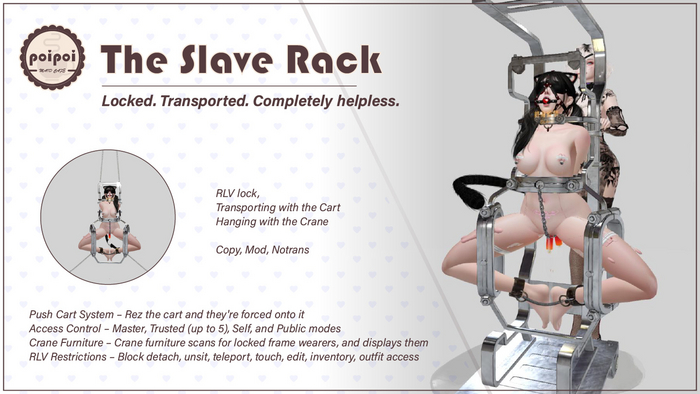
- The Frame
- A wearable rack that locks on with a full immobilization animation. Self Control mode (on by default) lets the wearer still shuffle around; switch it off and they're frozen exactly where you left them.
- The Push Cart
- Rez the cart and the locked wearer is forced onto it. You take the handles and drive with WASD, smooth vehicle physics, E to jump. Their body goes wherever you decide, and only you can put them down.
- The Crane
- Optional furniture that scans for locked frame wearers and force-seats them on display. Enable Recapture and anyone who wriggles free is automatically reclaimed: every 30 seconds, within 25 meters.
- Leash & Keys
- A particle-chain leash with Grab (lead them by hand) and Anchor (tie them to world objects) modes, adjustable 1–20 m, plus a Yank that pulls the wearer instantly. Or take the keys and hand unlock rights to whoever you choose.
- Layered Control
- Four access levels (Master, up to five Trusted, Self, Public), a menu of extra RLV restrictions on top of the always-on lock, and a countdown timer that frees them when it expires. Bilingual menus, English and 中文.
Changelogv2.1.24 updates — tap to expand
2.1.2
- Fixed "Clear All RLV" clearing lock and float height
- Fixed leash chain linking to wrong point
2.1.0
- Added timer to crane and rack
- More crane config options
- Captive cannot control crane
2.0.0
- Self Control Mode, Leash System (grab/anchor/yank, 1-20m), handle adjustment, crane auto-recapture
1.0.1
- Unlock rack now unsits from crane
How it works
Getting Started
Slave Rack is a wearable restraint system in three parts:
- Frame: a wearable attachment that immobilizes the wearer when locked
- Push Cart: lets others transport the locked wearer
- Crane: optional furniture that captures and displays locked frame wearers
The frame starts unlocked and invisible. Wear it, then open the menu by touching the frame or saying [first 2 letters of your name]rack in chat (channel 0 or 1; e.g. name is Alice → alrack).
- Open the menu.
- Click Lock: the frame becomes visible, the immobilization animation starts, and basic restrictions apply automatically (cannot detach, no touching from a distance).
- Click Unlock to release: animation stops, frame hides, all optional restrictions clear, cart mode ends, key holder and leash are removed.
Unlocking requires access (see Access Control); the wearer on the cart cannot unlock until put down.
Self Control
☑Self Control (main menu, frame must be locked) toggles whether the wearer can still move:
- On (default): the wearer can walk while locked, possibly slower.
- Off: the wearer is frozen in place.
Disabling Self Control while the wearer is on the cart automatically puts the cart down, a way for authorized users to freeze them at any moment.
Lock & Key Holder
The key system adds a layer of power exchange on top of the lock:
- Take Keys (frame must be locked): you become the key holder. When the Master holds the keys, only the Master or key holder can unlock; when someone else holds them, the key holder, Master, or Trusted can unlock.
- Return Keys: key holder only; clears the holder.
Unlocking the frame always clears the key holder, ends cart mode, and removes the leash.
Handheld Carry
The Push Cart lets an authorized user (never the wearer) transport the locked wearer.
To start:
- Frame must be locked.
- An authorized user (not the wearer) opens the menu and clicks Push Cart.
- The cart appears; the wearer is forced onto seat 1.
- The pusher must sit on seat 2 within 30 seconds, or the cart disappears.
Driving:
| Key | Action |
|---|---|
| W / S | Forward / backward |
| A / D | Turn left / right |
| E | Jump |
To end: the pusher clicks Stop Pushing, stands up, or the frame is unlocked.
Seat Adjust fine-tunes the wearer and pusher seat positions, with step sizes 0.01 / 0.05 / 0.15 m (click Step to cycle).
Leash
A particle-chain leash with two modes:
| Mode | Description |
|---|---|
| Grab | An authorized user holds the handle and leads the wearer |
| Anchor | The leash is tied to an in-world object (scans 10 m) |
| Button | Action |
|---|---|
Grab |
Take the leash handle; the wearer follows within leash length |
Anchor |
Pick a nearby object to tie the leash to; the wearer is constrained within leash length of it |
Yank |
Pull the wearer instantly to the holder (Grab mode only) |
Length |
Adjust leash length, 1–20 m (default 2.0 m) |
Remove Leash |
Release the leash |
Crane Display Mode
The Crane is optional furniture that captures and displays locked frame wearers.
| Button | Action |
|---|---|
> Capture < |
Scan for nearby locked frame wearers, pick a target: they are force-seated on the crane in frame pose (cart parts on the frame hide while captured) |
☑/☐ Recapture |
Auto-recapture: if the captive stands up, the crane rescans every 30 s within 25 m and reclaims anyone still wearing a locked frame |
RLV |
Apply additional restrictions to the captive (see below) |
Release |
Release the captive (released this way, recapture is not triggered) |
The captured avatar cannot open the crane menu at all: touching the crane does nothing for them. This is deliberate, to prevent self-release. Escape means: leave the 25 m range, unlock the frame, or wait for someone to Release you.
Someone sitting on the crane directly without being captured is checked: if they aren't wearing a locked frame, they're kicked off.
Crane restrictions (on top of the frame's): sitting locked, far touch, edit, teleport, all touch, inventory, name tags, chat, IMs, map/location, and camera distance.
Access Control
Four access levels, checked in order:
| Level | Description | Limit |
|---|---|---|
Master |
Full access, can always unlock | 1 person |
Trusted |
Can access and unlock | up to 5 |
Self |
The wearer's own access | on/off |
Public |
Anyone | on/off |
| Button | Action |
|---|---|
Owner+ / Owner- |
Set / remove Master (scan nearby) |
Trusted+ / Trusted- |
Add / remove Trusted |
☑/☐ Self Access |
Toggle the wearer's own access |
☑/☐ Public |
Toggle public access |
Self access must be off only after a Master is set; removing the Master re-enables self access if it was off. Trusted cannot include the Master.
RLV Restrictions
RLV (Restrained Love Viewer) restrictions limit the wearer's abilities. Blocking detach and far touch apply automatically whenever the frame is locked; the rest are optional:
| Restriction | Effect |
|---|---|
| Teleport | Blocks local TP, landmarks, TP offers, sit TP, flying |
| Touch All | Blocks all touching |
| Far Touch | Blocks touching from a distance |
| Touch World | Blocks touching world objects |
| Edit | Blocks editing/building |
| Inventory | Blocks inventory access |
| Outfit | Blocks adding/removing clothes |
The RLV menu toggles each restriction, with Apply All / Clear All shortcuts.
Requirements: an RLV-enabled viewer (Firestorm, Catznip, …) with RLV active; some effects (float height, crane force-sit) rely on it. If locked out completely, use the viewer's RLV emergency release or have the Master/Trusted unlock.
Timer
Both frame and crane carry a countdown timer that releases automatically on expiry (frame: unlock + clear restrictions + end cart + remove leash; crane: release without recapture).
- Max duration 24 hours; add time with +1min / +5min / +30min / +1hr.
- Start / Stop runs and pauses; Reset clears the duration while stopped.
- ☐/☑ Real Life switches timing modes: Game Time pauses when the sim is down; Real Life Time keeps counting through relogs.
Settings
| Button | Action |
|---|---|
▲ Float / ▼ Float |
Raise / lower avatar height (RLV-based; −2.0 to +2.0 m, default +0.24 m) |
Step: X.XXm |
Cycle adjustment step (0.01 → 0.05 → 0.15) |
▲ Handle / ▼ Handle |
Raise / lower the cart handle |
Resize |
Open the frame resizer |
Screen |
Screen settings (see below) |
☑/☐ Chain |
Toggle chain visibility |
Screen: the frame's upper and lower displays can each be toggled and set to preset texts:
| Preset | Text |
|---|---|
| 1 | Lifetime imprisonment |
| 2 | Slave |
| 3 | Prisoner |
| 4 | Death Row Inmates |
| 5 | Exiled |
| 6 | On Parole |
(The in-world menu shows these in Chinese when the interface is Chinese: 终身监禁 / 奴隶 / 囚犯 / 死刑犯 / 流放犯 / 监外服刑.)
What persists after detach: access settings, cart position adjustments, RLV settings (the frame itself detaches unlocked). Detach + reattach (or a script reset) returns it to the unlocked state. The whole interface is bilingual, English/中文.