
Shibari Maid Script Pack
Bondage system for MIWAS outfits: real ropes + escape minigame
An enchanted-rope bondage system for the MIWAS Shibari Maid Dress (also fits the shibari school uniform and shibari qipao). A back tie binds the arms behind your back with visible rope pieces, an independent crotch rope opens and closes with immersive descriptions, and a struggle mini-game (alternate A/D against tightness, decay, collisions, and crotch-rope accidents) decides whether you get free.
Surrender the keys with Enchant Ropes and escape becomes impossible: only the enchanter can release you. RLV restrictions, full access control with owner and trusted lists, optional PA2 arousal feedback, and an English/Chinese UI complete the package.
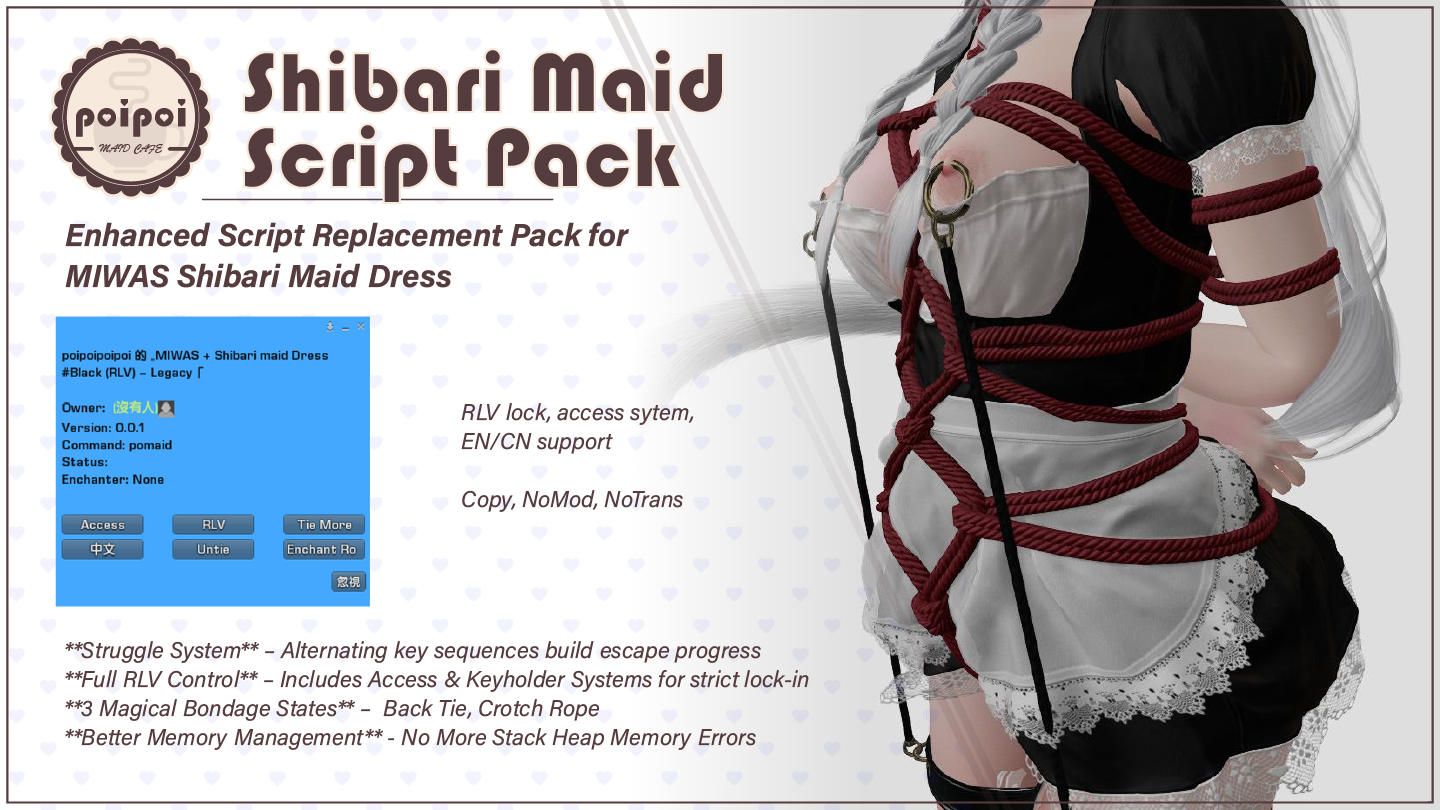
- Enchanted Ropes
- A back tie coils the ropes around your wrists and binds your arms behind your back with its own pose and visible rope pieces, while an independent crotch rope switches between closed and pulled aside: either or both at once.
- Keyholder Magic
- Anyone can take the keys with Enchant Ropes. Once enchanted, struggling can never free you and only the enchanter (or the owner and trusted ones) may untie, adjust, or touch the locked menus.
- Struggle Mini-Game
- Alternate A/D to work the ropes loose while progress decays with tightness. Bumping into people costs progress, every input has a 5% chance of yanking the crotch rope, and auto-struggle mode builds progress hands-free.
- RLV Control
- Touch, fartouch, and inventory restrictions toggle from the menu, the dress can't be removed while bound, and one Untie clears everything.
- Pull Crotch Rope
- One button yanks the rope, drags the wearer toward the puller for about two seconds, and, with PA2 installed, forces a moan and a surge of arousal.
- Bilingual & Tunable
- Switch the whole UI between English and Chinese from the menu, and tune struggle difficulty, tightness range, and the menu command live in the `ShibariMaid.Config` notecard.
How it works
Getting Started
- Wear the MIWAS Shibari Maid Dress and its rope piece: right-click → Attach.
- Grant the animation and control permissions when prompted.
- Open the menu in either of two ways:
- Touch the dress (control prim), or
- Chat command:
[first two letters of wearer name]maid, said in public chat or on channel 1 (e.g. wearer "Alice" →almaid).
- On first attach, the system tells you the exact command to use.
RLV restrictions require an RLV-enabled viewer (e.g. Firestorm, Catznip). The bondage, struggle, and menu features work without RLV.
Rope Menu
Open the Rope Control menu with Tie More while tied (requires access).
| Button | Effect |
|---|---|
🪢Back Tie / Back Untie |
Bind the arms behind the back with an automatic bondage pose and visible rope pieces, or release them. Binding: "The enchanted ropes coil around your wrists, pulling your arms behind your back in a tight 後手缚..." Untying: "The ropes binding your wrists loosen and fall away, freeing your arms from the 後手缚..." |
🪢Crotch Close / ❤️Crotch Open |
Close the crotch rope (show the "closed" pieces, hide "open") or pull it aside (show "open", hide "closed"). Closing: "The enchanted ropes slither between your thighs, wrapping tightly around your most intimate areas..." Opening: "The ropes between your thighs loosen and fall away, exposing your intimate areas..." |
Return |
Back to the main menu |
- Back tie and crotch rope are independent states: either or both can be active.
- The crotch rope is untouched by the general Untie; it must be opened/closed from this menu.
- While the back tie is active, no-detach is applied automatically (removed when untied).
Pull Crotch Rope
Pull Crotch Rope (main menu, while tied) yanks the wearer's crotch rope:
- Rope sound and immersive text: different versions when the wearer pulls it herself vs. someone else pulling.
- The wearer is dragged toward the puller for about 2 seconds (and force-unsat if sitting).
- Triggers a forced moan and a surge of arousal via PA2.
Enchantment
- Enchant Ropes takes the keys. The taker becomes the Enchanter: escape by struggling becomes impossible, and only the enchanter (or the owner/trusted users, if the enchanter is not the owner) may untie, adjust, or open menus that need the keys. The action plays a magic sound and announces "The ropes have been enchanted by [name]".
- Anyone who then tries without permission gets: "The enchanted ropes glow with protective magic, denying your touch. Only the enchanter or trusted ones may release this bound soul." The wearer gets: "The enchanted ropes tighten around you, making you helpless. You whimper softly as you realize only the enchanter can release you from this magical bondage."
- Dispel Magic releases the enchantment (keyholder or owner only): "The enchantment has been dispelled by [name]". Trying to dispel someone else's enchantment: "You can only dispel your own enchantment."
- Untying also clears the keyholder.
Struggle Mini-Game
Available from the main menu (Struggle, wearer only, while tied with the back tie active). The struggle menu shows current progress (0–100), tightness (default range 20–80), decay rate, auto-struggle ON/OFF, and enchanted status.
| Button | Effect |
|---|---|
Start Struggle |
Begin the mini-game; returns to the main menu |
Enable Auto / Disable Auto |
Toggle auto-struggle: progress builds automatically without pressing keys; manual A/D is ignored while enabled |
Return |
Back to the main menu |
How it works
- Rapidly alternate A and D (turn left/right). Each valid alternation adds
struggle_base_boostprogress (default 3.0). Pressing the same key twice adds nothing; any other movement key stops the struggle. - Progress decays continuously at
tightness × decay_multiplierper second (default 0.05). Progress reaching 0 never fails the game: keep struggling. - Reaching 100 frees you: the back tie is removed (not a full untie): "SUCCESS! Through sheer determination you've worked yourself free from the rope bondage!"
- Enchanted ropes: reaching 100 does not free you: "Your desperate writhing has reached its peak, but the enchanted ropes hold firm! The magical binding prevents any hope of escape." Progress is then reset to 50. Enchanted decay is higher, making escape impossible.
- Movement is restricted while the struggle is active; the struggle animation plays and a rope sound loops.
- Floating text above you shows live status:
STRUGGLING..., a ■/□ progress bar withn/100,Tightness: t (20-80), and, when enchanted,ENCHANTED - Cannot escape!. - Collisions: bumping into another avatar while struggling (2-second cooldown per hit) plays a sound and subtracts progress; the loss grows with tightness: "You stumble against something while struggling in the ropes!..."
- Crotch rope accidents: each valid input has a 5% chance to yank the crotch rope: "Your frantic thrashing against the ropes causes you to accidentally yank the crotch rope tighter..." Progress drops by 50, and arousal/moans are triggered (PA2).
Tightness
Tightness (default 50, range 20–80 by default) controls decay. Non-wearers adjust it from the main menu:
- Tighten +10 / Loosen −10 (clamped to the configured range), each with a rope sound and a forced moan (PA2): "You slowly tighten the enchanted ropes, savoring every inch..." / "You tease the enchanted ropes looser..."
- The current tightness is shown on the main menu while tied.
Access Control
Open with Access. Shows the current owner and trusted list.
| Button | Effect |
|---|---|
Owner+ |
Scan up to 22 avatars on the parcel and pick a new Owner (Master). The new owner is notified and removed from the trusted list: "Owner set to [name]" |
Owner- |
Remove the owner; self-access is forced back on: "Owner removed." |
Trusted+ |
Scan nearby avatars and add one to the trusted list (max 5): "Added trust [name]" / "Can have up to 5 trusted users" |
Trusted- |
Pick a trusted user to remove from a numbered list ("Remove Trust"): "Removed trust [name]" |
☑/☒Self Access |
Toggle whether the wearer may use the menu. Turning it off requires an owner to be set first ("Must set owner first."). When off, the wearer can only struggle. |
☑/☒Public Access |
Toggle whether anyone may use the menu. When off, only the owner and trusted users have access. |
Return |
Back to the main menu |
Access priority: Owner → Wearer (if self-access) → Trusted → Public.
RLV Restrictions
The RLV menu opens from the main menu (RLV, while tied). Restrictions apply to the wearer; the menu requires access (and keyholder permission).
| Button | Restriction |
|---|---|
✅Touch / ❌Touch |
@touchall=n: block the wearer from touching objects |
✅Fartouch / ❌Fartouch |
@fartouch=n: block touching objects from a distance |
✅Inventory / ❌Inventory |
@showinv=n: hide the wearer's inventory |
Clear All |
Remove all three restrictions above |
Return |
Back to the main menu |
- No-detach (
@detach=n) is applied automatically whenever the ropes are tied (and while the back tie is active) and released on untie; the dress cannot be removed while bound. - Untie clears every RLV restriction, including the three above.
RLV features require an RLV-enabled viewer.
Settings
Language
The UI language is shared across all menus. Use the 中文 button (shown in English mode) or the EN button (shown in Chinese mode) to switch; it applies immediately to all menus, floating text, and messages.
Configuration Notecard: ShibariMaid.Config
Settings live in the ShibariMaid.Config notecard inside the dress. Format is name = value; lines starting with # are comments. Saving the notecard (or any inventory change) reloads the configuration immediately: no restart needed.
| Parameter | Default | Description |
|---|---|---|
config_menu_cmd |
maid |
Menu word. The full command is the first two letters of the wearer's name + this word (e.g. maid → almaid for "Alice"). |
struggle_base_boost |
3.0 |
Progress gained per successful A/D alternation (recommended 1.0–2.0). Higher = easier escape. |
decay_multiplier |
0.05 |
Decay rate = tightness × this value (recommended 0.02–0.03). Higher = harder struggle. |
auto_struggle_rate |
1.0 |
Progress per auto-struggle tick (recommended 0.5–1.0). Higher = stronger auto-struggle. |
min_tightness |
20 |
Minimum allowed tightness. |
max_tightness |
80 |
Maximum allowed tightness. |
default_tightness |
50 |
Starting tightness (between min and max). |
Unknown option names and malformed lines are reported to the wearer when the notecard loads ("Unknown configuration option: ..." / "Configuration could not be read on line N").
PA2 Integration
ShibariMaid integrates with PA2 (Project Arousal 2) automatically when the PA2 arousal system is present. Pulling the crotch rope, crotch-rope accidents during struggle, and Tighten all trigger a forced moan and an arousal increase.
Without PA2 the pack works normally: you just don't get the arousal/moan feedback.
Chat Commands
- Open menu: touch the dress, or say
[first 2 letters of wearer name]maidin public chat or on channel 1 (e.g.almaid) - Tie / Untie:
❤️Tie❤️/Untie(main menu) - Ropes:
Tie More→🪢Back Tie/🪢Crotch Close - Keys:
Enchant Ropes/Dispel Magic - Escape:
Struggle→Start Struggle→ alternate A/D - RLV:
RLV→Touch/Fartouch/Inventory/Clear All - Access:
Access→Owner±,Trusted±,Self Access,Public Access