
The Purrfect Gag
Ball gag: everything you say comes out muffled
The Purrfect Gag is a ball gag that takes over your voice. Everything you say comes out muffled for everyone around you, with voice sounds, drool, and mouth animation for the full effect. Tighten it a level at a time until even begging stops working.
Lock it on, hand over the keys, and stack a timer and RLV communication blocks on top, or run it silent in Plugin Mode behind your favorite gag's looks. Invisible until activated, bilingual menus, resizable to any muzzle.
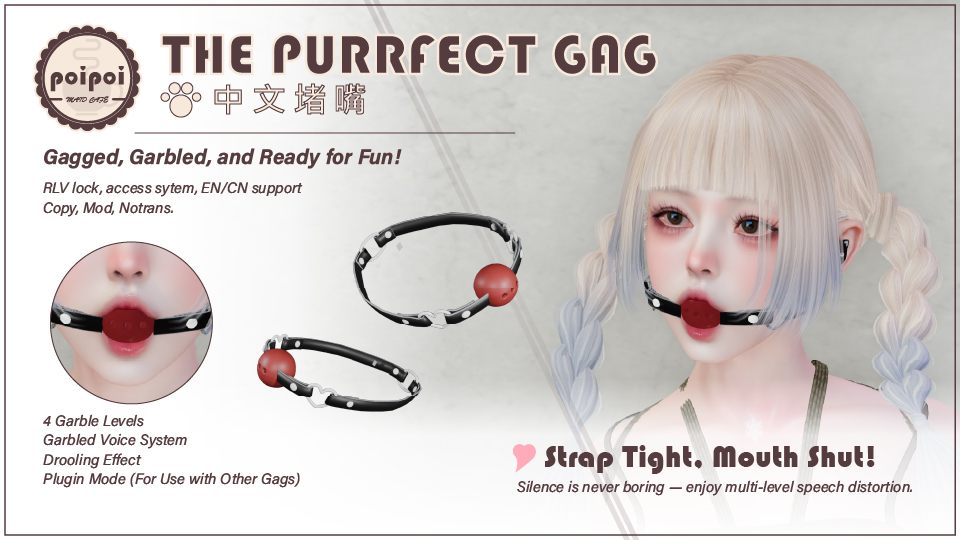
- Four Garble Levels
- Tighten from Low (most words still get through) to Medium's muffled whimpers, High's near-total unintelligibility, and finally Silence, where nothing passes at all. Adjust live from the menu while they beg.
- A Full Performance
- Every muffled line comes with gag voice sounds, drool particles, and mouth animation: the whole scene sees and hears exactly how effective the gag is.
- Lock & Keys
- Lock the gag on and hand the keys to someone else. Until they return them, only the key holder decides when it comes off, how tight it sits, and whether the original text ever shows.
- Auto-Unlock Timer
- Set a countdown up to 24 hours that unlocks and removes the gag when it expires. Game Time ticks only while worn; Real Life time keeps counting even after logout.
- RLV Communication Lockdown
- Optionally block sending or receiving IMs, starting new conversations, or all local chat. Restrictions clear automatically the moment the gag comes off.
- Plugin Mode
- Already devoted to another gag? Hide the mesh and the animation, keep the muffled speech: your KDC or Real Restraint gag does the looking, the Purrfect Gag does the talking.
Changelogv2.1.14 updates — tap to expand
2.1.1
- Fixed: adding an owner or trusted user (and other messages to other people) could cause a stack-heap error
2.1.0
- All menus restyled: an icon on every button, capital-letter English labels, a 🌐 language button, and ↩ BACK on every submenu
- Gag messages now appear as emotes in your chat, without the object name
- Fixed: your own color tint on the gag is now kept when it is shown and hidden
2.0.2
- Your own texture and material edits on the gag are now kept when it is shown and hidden
- New user guides with an online manual link
2.0.1
- Initial release
How it works
Getting Started
The Purrfect Gag muffles everything you say in local chat, complete with voice sounds, drool particles, and mouth animations. It stays invisible until activated: nobody knows it's there until it's on.
- Wear the gag.
- Open the menu: touch the gag, or type
[first 2 letters of your name]gagin public chat or on channel 1. (Name is Josh →jogag) - Press ☐ GAG to put it on.
- Press 🔒 LOCK to lock it on: from here on, keys and access decide who's in charge.
RLV features (see RLV Restrictions) need an RLV-enabled viewer, such as Firestorm with RLVa switched on.
Pet Speech
Garble strength is adjusted live with 🔗 TIGHTEN and 🍒 LOOSEN: the gag status shows the current level at all times.
| Level | Label | Effect |
|---|---|---|
| 1 | Low | Light garble, most words get through |
| 2 | Medium | Words become muffled whimpers |
| 3 | High | Speech nearly unintelligible |
| 4 | Silence | No speech passes through at all |
How the garble behaves is shaped in ⚙ SETTINGS: Strict Mode garbles 100% of messages of 5 characters or fewer (no short words slipping through), Stutter randomly repeats characters, and Garble Effect toggles character-replacement entirely. With Cheat Mode on, the original text is shown in brackets after the garbled output: turn on Cheat Owner Only so nobody but the owner gets to read it.
Lock & Key Holder
Lock the gag, then press 🗝 TAKE KEY: from that moment only the key holder (or owner/trusted users) can unlock, tighten or loosen, toggle Cheat Mode, or open the RLV and Settings menus. Keys are released automatically the moment the gag is unlocked.
Timer
Available while the gag is locked. When the countdown ends, the gag is removed and all restrictions are cleared. Maximum 24 hours.
| Button | Action |
|---|---|
+1min / +5min / +30min / +1hr |
Add time |
Start / Stop |
Start or cancel the timer |
♻ RESET |
Clear the duration |
☑/☐ REAL LIFE |
Count real-world time instead of game time |
Game Time only ticks while the gag is worn. Real Life counts real-world seconds and keeps running after you log out.
RLV Restrictions
Optional communication restrictions: toggle each one individually, or remove everything at once with 🧹 CLEAR ALL.
| Button | Restriction |
|---|---|
☑/☐ SEND IM |
Block sending instant messages |
☑/☐ RECEIVE IM |
Block receiving instant messages |
☑/☐ START IM |
Block starting new IM conversations |
☑/☐ SEND CHAT |
Block all local chat entirely |
All restrictions clear automatically when the gag is turned off.
Access Control
Set in the 🔐 ACCESS menu:
| Button | Action |
|---|---|
Owner+ / Owner- |
Set or remove the owner |
Trusted+ / Trusted- |
Add or remove trusted users (max 5) |
☑/☐ SELF ACCESS |
Whether the wearer can use the menu |
☑/☐ PUBLIC ACCESS |
Whether anyone can use the menu |
Self Access cannot be switched off until an owner is set: the wearer can never lock themselves out of their own gag by accident.
Settings
Gag Settings
| Button | Default | Action |
|---|---|---|
☑/☐ STRICT MODE |
Off | 100% garble all messages of 5 characters or fewer |
☑/☐ VOICE |
On | Play gag voice sounds when speaking |
☑/☐ STUTTER |
On | Randomly repeat characters with a stutter effect |
☑/☐ DROOLING |
On | Show the drool particle effect |
☑/☐ GARBLE EFFECT |
On | Enable character-replacement garbling |
☑/☐ CHEAT OWNER ONLY |
Off | In Cheat Mode, only the owner sees the original text |
☑/☐ RENAME |
Off | Display a custom name instead of your avatar name |
✏ SET NAME |
N/A | Set the custom name used when Rename is on |
☑/☐ ANIM |
On | Enable or disable mouth animation |
📐 RESIZE |
N/A | Resize the gag mesh in-world |
Plugin Mode
For wearing the Purrfect Gag's muffled speech behind another gag's looks (KDC, RR Real Restraint, …): set the other gag to its total-silent mode, then toggle ☐/☑ PLUGIN MODE on while the Purrfect Gag is off. Your speech still comes out muffled as usual; the mesh stays hidden and no mouth animation plays.
Resize
Fit the mesh without entering edit mode: 📐 STRETCH ALL, two-axis (📐 STRETCH XY / XZ / YZ) or single-axis (📐 STRETCH X / Y / Z) scaling, fine steps from -10% to +10%, and ♻ RESTORE to reset to the original size.
Gag Plugin
The package includes a standalone plugin script, poi_gag_plugin, that adds the same muffled speech to gags from other makers: your favorite gag keeps its looks, and the plugin muffles what you say. Menu, owner and access control are built into the plugin itself.
Back up the gag first. Some gags are no-copy: work on a safe spot and take extra care.
Open the Plugin Menu
Type [first 2 letters of your name]gag in local chat (channel 0 or 1): Alice → algag. Garbling starts ON by default; your command is shown when the plugin starts.
| Button | Action |
|---|---|
Garble: ON/OFF |
Turn garbling on or off |
Level: 1/2/3 |
Cycle garble strength (1 = light, 3 = heavy) |
Set Owner / Clear Owner |
Scan nearby avatars (within 10 m) to pick an owner, or go back to self-owned |
Cheat: OFF/ON/Owner |
OFF: garbled text only. ON: original in brackets for everyone. Owner: original sent privately to the owner |
Chan: xxx |
Change the RLV redirect channel |
☑/☐ Rename / Set Name |
Show a custom name on garbled speech |
☑/☐ Public |
Let anyone use the menu |
☑/☐ Self |
Let the wearer use the menu (owner only; only shown when an owner is set) |
Emotes (/me) are never garbled. Short messages, long messages, questions and exclamations each get their own gag sounds.
Add to a KDC Gag
- Rez the gag on the ground and open Edit.
- Tick Edit Linked Parts and select the part named
:.
- Delete all scripts inside that part.
- Drop
poi_gag_plugininto it.
- Take the gag back into your inventory and wear it. If it was already worn, detach and re-attach.
Wear the KDC RLV Activator HUD 2.5 or the plugin will not work.
Add to an RR Real Restraint Gag
Gag name: Deluxe gag (mouth). RR gags are no-copy, so do this in a safe spot.
- Rez the gag and drop
poi_gag_plugininto Deluxe gag (mouth). The rezzed gag is invisible on the ground. PressCtrl+Alt+Tto toggle highlight transparent, so you can see it. - Take it back and wear it, then pick your gag style (e.g. Total Ring).
- In the gag menu open Plugins > Gag, turn Ch. evasion OFF and Silent ON.
- Say
channel 100in local chat. The gag confirms the chat is redirected to channel 100.
Troubleshooting
- Menu won't open: check the command (first 2 letters of your name +
gag). If Self access is off, only the owner can open it for you. - No garbling: make sure Garble is ON and RLV chat redirect is enabled in your viewer.
- Can't see nearby avatars: they must be within 10 m; press
Rescan.