
MeowTalker
In-ear headphones: turns your speech into meows, step by step
High-tech in-ear earbuds with a direct mind-control link that regresses the wearer into a kitty: a rising meowify level gradually takes over their speech, their hearing, and their sense of who's nearby. Training controls for the owner, a lock with key holder and self-bondage, and full EN/CN menus out of the box. Needs an RLV-enabled viewer (Firestorm, Catznip) for the speech, lock, and name-blur features.
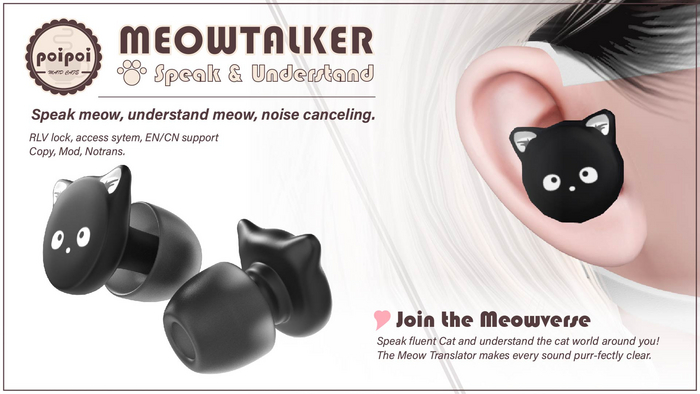
- Speak Meow
- Flip the meow switch and every line the wearer speaks nudges the meowify level higher: lightly meowed, half, mostly, then all meows. The more they talk, the less human speech is left.
- Training
- Owners, trusted users, and the key holder can deepen the regression or ease it back, from the menu, or in chat: `kitty meow` sends it straight to the top, `kitty speak` gives their words back. `kitty come here`, `sit`, and `stay` even move and freeze the kitty for real.
- Understand Meow
- Hearing Block turns the whole world cat: public chat around the wearer gets delivered as increasingly meowified text. Say `good kitty` out loud and every restriction eases for a moment: real hearing, real speech, real names.
- Meow Network
- Two MeowTalkers recognize each other. Each wearer hears the other's words relayed clearly, untouched by any meowify level. Join the meow network today.
- Lock, Keys & Self-Bondage
- A proper RLV lock keeps the earbuds in until someone authorized unlocks. Hand the keys to a key holder, or lock yourself in on a self-bondage timer of up to 30 days; no early way out.
- Quiet Mode & Name Blur
- Independently quiet the wearer's private messages, emotes, and gestures, or go fully deaf to nearby chat. At higher levels the wearer even loses track of who's around: names and tags blur into noise.
Changelogv2.0.04 updates — tap to expand
2.0.0 · August 2026
- Added progressive meowify levels (0-4) that scale speech and hearing effects
- Added Training controls to adjust the meowify level
- Added key holder and self-bondage
- Renamed several features to consistent "Meowify" naming
- Added Hearing Block for overheard chat
- Added Cmd Settings for customizing chat trigger words
- Added MeowSound toggle
- Added Exception Mode
- Added physical effects for the come here / sit / stay / lets go chat commands
1.4.0 · August 2026
- Added Hearing Block
- Added RLV submenu
- Added keyword relief window
1.3.0 · July 2026
- Rebuilt the device with a modular script structure
1.1.0 · January 2025
- Added a distinct meow sound for questions (sentences ending in "?")
How it works
Getting Started
- Wear it: right-click the MeowTalker → Attach to slot the earbuds in and link up.
- Find your menu command: on first wear (or after a script reset) the wearer gets a private message with the menu command, e.g.
Menu command is: xx you can say it in public chat or channel 1 to open the menu. - Open the menu: say that command in public chat, say it on channel 1 (e.g.
/1 <command>), or simply touch the headset. - Turn it on: lock the earbuds, then choose Meow Sw to start meowing.
The menu command is built from the first two letters of the wearer's name and the first five letters of the headset's description. Change the description and the command changes too. You can always just touch the headset to open the menu.
The meow speech, the lock, and the name-blur effect need an RLV-enabled viewer (such as Firestorm or Catznip). The menus themselves work on any viewer.
Pet Speech
Meow Switch
Meow Sw (menu) turns the pet speech on and off. When on, the wearer's chat is replaced with meows; when off, they speak normally. It can only be turned on while the device is locked: unlocking always turns it off.
Meowify Levels
Every meowed line raises the meowify progress by a few random points. Five levels, each deeper into the regression:
| Level | Progress | Wearer's own speech | What the wearer overhears | Name blur |
|---|---|---|---|---|
| 0 | 0-19 | Normal | Normal | Off |
| 1 | 20-39 | Lightly meowed | Normal | Off |
| 2 | 40-59 | Half meowed | Lightly meowed | Off |
| 3 | 60-79 | Mostly meows | Heavily meowed | On |
| 4 | 80-100 | All meows | All meows | On |
Progress never drops on its own: it only goes down when someone reduces it back.
Training (menu)
Owners and trusted users get a Training entry in the main menu (the key holder too, whenever they can reach the main menu):
| Button | Action |
|---|---|
Deepen Meowify |
Push progress up |
Reduce Meowify |
Roll progress back down |
Clear Meowify |
Drop progress straight to zero |
Full Meowify |
Push progress straight to the top |
Training (chat)
Owners, trusted users, and the key holder can steer the level in public chat: say the nickname (defaults to kitty, or 小猫 when the command language is Chinese; customizable in Cmd Settings) plus a trigger word:
kitty come here: small roll backkitty sit: small roll backkitty stay: small roll backkitty good: tiny roll backkitty meow: straight to the topkitty speak: straight to zero (let the kitty talk again)
come here, sit, and stay also do something physical: come here pulls the wearer to the speaker, stay freezes the wearer in place (no walking, running, jumping, or flying), and sit is stay plus the device's sit animation. Both are released by kitty lets go, and unlocking the device clears them too. The nickname is the prefix, so only the kitty it's set to will respond.
Hearing Block
Hearing Block (Settings menu) turns the world meowy too. At level 1, public chat around the wearer is moved to private delivery but stays readable. From level 2 it becomes increasingly meowified; at level 4 it is all meows. At level 0, hearing stays normal.
Say "good kitty" out loud (or "乖猫猫" while the command language is Chinese) and real hearing peeks through for a short window before the meows close back in, a quick word of praise to call the kitty back.
Meow Network
Two MeowTalkers recognize each other: when two people each wear one, each hears the other's words relayed clearly, unaffected by any meowify hearing level. Join the meow network today.
RLV Restrictions
The RLV menu holds the restriction toggles:
Private Chat: quiets the wearer's outgoing private messages.Emote: blocks the wearer from receiving others' emotes.Gesture: blocks the wearer from playing their own gestures.Deaf Mode: the wearer hears nothing of the chat around them at all. Hearing Block normally still delivers a meowified version privately; Deaf Mode silences even that. With Exception Mode (Settings) on, the owner, trusted users, and the key holder still come through clearly.
All four can be flipped on or off independently at any time.
Name blur (scrambling the wearer's sense of who is nearby, names and name tags) is not a manual toggle: it turns itself on once the meowify level reaches 3 and stays on until the level drops back below 3, as long as Blur Names in Settings is on.
Lock & Key Holder
Lock / Unlock
Lock / Unlock keeps the headset on. While locked, the wearer can't remove it until someone with access unlocks it.
Key Holder
A key holder is whoever takes and holds the wearer's keys: while they hold them, the wearer can't unlock free, even with self access on.
Take Keys: pick up the keys while the headset is locked and unclaimed. The wearer is told who took them.Return Keys: hand the keys back. Only shown to the current holder.
The main menu shows the current key holder by name, Self-Bondage if the wearer locked themselves in, or None.
While a real key holder exists, the wearer cannot unlock or change Meow, Settings, or RLV controls. If the owner holds the keys, only the owner can unlock; if someone else holds them, the key holder, owner, or a trusted user can unlock.
Timer & Self-Bondage
The Timer menu supports any duration: stack time with +1min / +5min / +30min / +1hr (30-day cap), Reset to zero, Start to begin the countdown (auto-unlocks at expiry), Stop to cancel. While the timer runs, the owner, trusted users, the key holder, or a wearer whose keys weren't taken can extend it with the same buttons.
No key holder around? Lock yourself in:
- Build the duration, then choose
Self-Bondage(only offered to the wearer, only when no key holder is set and the timer isn't running). - The headset locks and the keys vanish until the timer ends. The Timer menu switches to a self-bondage view showing duration and remaining time; the wearer only gets the Return button.
- Only the owner or a trusted user can release early with
Release, or extend the time with the +time buttons. The wearer cannot let themselves out, even with self access on. - When the timer runs out naturally, the key returns; the lock stays, and the wearer may unlock at leisure.
Training (Deepen/Reduce/Clear/Full Meowify) is separate from self-bondage: a self-bound kitty's level can still be adjusted. The countdown pauses while the headset is off and resumes when worn again.
Access Control
The Access menu manages who can use the headset:
| Button | Action |
|---|---|
Owner+ / Owner- |
Set or clear the single owner |
Trusted+ / Trusted- |
Add or remove trusted users (max 5) |
Self Access |
Wearer can use their own menus |
Public Access |
Anyone nearby can use the headset |
Owner and trusted users have general main-menu access. The wearer needs Self Access; everyone else needs Public Access. Only the owner, or the wearer with Self Access, can change the access list and toggles. Holding the keys alone grants chat-command and Timer privileges, not fresh main-menu access. Owner and trust are picked from a scan of nearby avatars.
Settings
Settings menu:
| Button | Action |
|---|---|
Hearing Block |
See the speech section above (meowifies what the wearer overhears) |
Speech Block |
Off = the wearer's own speech stays ungarbled regardless of level; on (default) = self-speech follows the level table |
Blur Names |
Off disables the auto name-blur at level 3+. Default on |
FloatText |
Toggle the floating meowify-level text above the headset |
GarbleEmote |
Off (default) lets /me emotes pass through unmeowified; on meowifies them like speech |
MeowSound |
Toggle the meow sound effect without changing the meowified text. Default on |
Exception Mode |
On (default): the owner, trusted users, and the key holder privately read the wearer's original words (everyone else still hears meows) and come through clearly under Deaf Mode and Hearing Block |
Relief Duration |
Pick how long ALL meow restrictions pause after the trigger word (good kitty / 乖猫猫): 10s to 5min. Default 1min |
Cmd Settings |
Customize the nickname, the chat trigger words, and the Hearing Block trigger word. Show Commands prints the current values in chat |
Reset to Default |
Reset all the settings above to defaults, and reset the nickname and trigger words to the current menu language's defaults |
Language: switch menus anytime with the 中文 / EN button in the main menu. Switching menu language never changes the trigger words: use Reset to Default in the language you want to adopt its defaults.
FAQ
- Wearer has self access but can't unlock? A key holder is set or self-bondage is active: the lock holds until the keys come back or the timer ends.
- Owner's chat triggers don't respond? Triggers need the nickname as the exact prefix and only work for the owner, trusted users, or the key holder; check both.
- Does the level reset when taken off? No. Meowify progress is kept by the headset and only changes when adjusted, or rises as the wearer meows.