
Exposed HookRod
Hook restraint: locks a bent-over pose, leash system included
Exposed HookRod is an anal hook restraint that combines physical restraint with RLV restrictions and PA2 integration. When locked, it keeps you in a bent-over pose with the hook fully visible, slows your movement to short steps, and prevents running, flying, and jumping.
Every step you take can trigger PA2 arousal in all the right (wrong) places, with forced moans to match. Optional RLV rules limit teleport, touch, and inventory access, a full leash system lets someone anchor you to objects or drag you around by the handle, and key management means that once your keys are taken, your freedom belongs to whoever holds them.
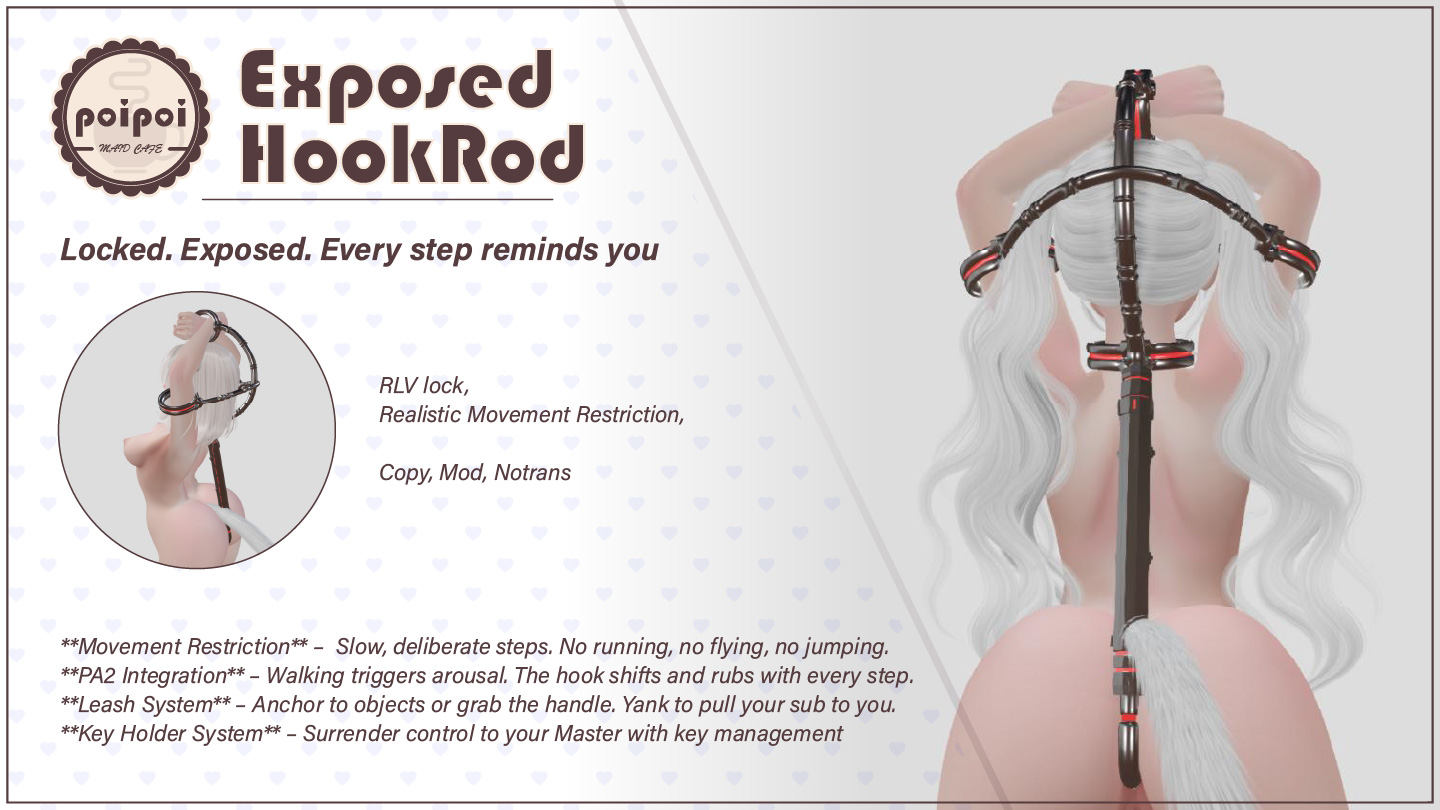
- Exposed Restraint
- Lock it and the hook appears for everyone to see, holding you in a bent-over pose with custom idle, walk, and sit animations. Movement slows to short steps: no running, flying, or jumping.
- Lock & Keys
- Hand the keys to whoever deserves them. Once someone holds your keys, when (or whether) you get unlocked is entirely up to them.
- Leash System
- Anchor the leash to nearby objects, let someone grab the handle and lead you around, or yank you to their feet. Adjustable 1–20 m and compatible with LockGuard handles and collar systems.
- RLV Restrictions
- While locked, the device always prevents detaching, running, and flying. On top of that, teleport, far touch, touch, and inventory restrictions can each be toggled on individually, and they survive relogs.
- Movement Arousal
- Walking while locked can trigger PA2 anal stimulation with a forced moan, complete with blush-worthy lines in local chat. Trigger chance and intensity are tunable in the config notecard.
- Access Control
- One owner, up to five trusted friends, self-access, or fully public: you decide exactly who gets to play with your hook.
How it works
Getting Started
- Wear the device: right-click → Attach.
- On attach, the device tells you its menu command in chat. The command is the first 2 characters of your name +
hook(e.g. wearer "Alice" →alhook). - Open the menu: touch the device, or say the command in public chat or on channel 1.
- Optionally configure access first (owner, trusted, self access, public access).
- Click Lock to lock the device.
- Use Take Keys to hand the keys to someone, or Leash to attach a leash.
The main menu always shows the current status: owner, version, command, lock state (🔒 Locked / 🔓 Unlocked), and key holder (None, or the name of whoever holds the keys).
RLV restrictions require an RLV-enabled viewer (e.g. Firestorm with RLVa). Locking, keys, and the leash work without RLV.
Lock & Key Holder
Lock: Menu → Lock. Anyone who can open the menu (owner, wearer with self-access, trusted friends, or anyone if public access is on) can lock. On lock:
🔒 Hookrod locked- The hook restraint becomes visible
- Animations play: bent-over upper-body pose plus custom idle, walk, and sit animations (allow the animation and take-controls permission requests; both are required for pose control)
- Movement slows to short steps; no run/fly/jump (if Slow Effect is enabled in Settings)
- While locked, the device always prevents detaching, running, and flying, plus any optional RLV restrictions you enabled
Unlock: Menu → Unlock. 🔓 Hookrod unlocked. The hook hides, animations stop, all RLV restrictions and effects clear, and the leash is removed. Unlocking also clears the key holder. If already unlocked: Already unlocked.
Keys
Available when the device is locked.
- Take Keys: only offered when no one holds the keys. Can be taken by the owner, trusted friends, or anyone (if public access is on). The wearer sees
Key has been taken by <name>; the taker seesYou have taken the keys of <wearer>. If already held:Key has already taken by <name> - Return Keys: only the current key holder can return their own keys (
You can only return keys to yourself.; with no keys:You have no keys to return.). Feedback:Keys have been returned by <name>/You have returned the keys of <wearer> .
Who can unlock:
- Keys with the owner: only the owner (as holder) can unlock
- Keys with a trusted friend: the holder, the owner, and other trusted friends can unlock
- Keys with someone else: the holder, the owner, and trusted friends can unlock; the wearer cannot, even with self-access
- No keys held: anyone with menu access can unlock
Anyone not permitted gets Access Denied. Keys automatically clear when the device unlocks.
Leash
Available when the device is locked. Menu → Leash. Usable by the key holder or owner.
The leash menu shows the current length (Leash length: 2m) and, when attached, the status (Status: Attached to <target>).
| Button | Effect |
|---|---|
| Anchor | Leash to a nearby object, scans objects within 10 m (up to 20 listed; if more: Detected <n> targets, showing first 20). Pick from Who do you want to leash to? or Cancel. Nothing found: No objects detected nearby |
| Grab | The person opening the menu holds the leash handle and the wearer follows them (LockGuard handle; must be worn/held by that person). While grabbed, the menu shows Yank and Anchor instead |
| Yank | Only the person holding the leash can yank (Only the person holding the leash can yank it.). Pulls the wearer to the holder's position, forces them to stand if sitting, holds the pull for about 2 seconds |
| Length | Numeric adjust dialog (New leash length: {VALUE}m (1-20)). Range 1–20 m, default 2 m. Feedback: Leash length set to <n>m; adjusting re-attaches the leash |
| Remove Leash | Detach the leash |
Other feedback: Leash attached · Invalid leash target - unable to establish connection · if an anchored target disappears Leash target disappeared - RLV restrictions removed, and when it returns Leash target returned - RLV restrictions restored.
Removing the leash or unlocking the device also releases the wearer.
The leash uses a LockGuard leashpoint and is compatible with LockGuard leash handles and collar systems.
Access Control
Menu → Access. Only the owner or the wearer (with self-access) can open this menu.
| Button | Action |
|---|---|
| Owner+ / Owner- | Scan avatars within 25 m (up to 22 listed, wearer included) to set an owner, or remove the current one. Owner set to <name> / Owner removed. Removing the owner also re-enables self-access; setting an owner removes them from the trusted list |
| Trusted+ / Trusted- | Add/remove a trusted friend (same 25 m scan), up to 5. Added trust <name> / Removed trust <name>; errors: Already added trust. / Can have up to 5 trusted users / Target is already your owner. |
| ☑/☒ Self Access | Whether the wearer can lock/unlock themselves. Disabling requires an owner set first (Must set owner first.) |
| ☑/☒ Public Access | Whether anyone can use the device |
Permission levels:
- Owner: full control: lock/unlock, keys, leash, RLV, settings, access
- Trusted friends (up to 5): lock/unlock (subject to key holder rules), take/return keys, leash, RLV, settings
- Wearer (self-access): can lock/unlock themselves when self-access is enabled
- Public: anyone can interact when public access is enabled
RLV Restrictions
Available when the device is locked. Menu → RLV. Configurable by the key holder or owner.
Each restriction shows its state (❌ Blocked / ✅ Allowed) with a toggle:
| Restriction | Blocks |
|---|---|
| Teleport | Local teleport, landmark teleport, teleport offers, teleport-sit |
| Far Touch | Touching objects from a distance |
| Touch | All touching |
| Inventory | Opening inventory |
- Clear All: removes all four optional restrictions at once (
✓ All RLV restrictions cleared)
While locked, the device always prevents detaching, running, and flying; these clear only when unlocked (Clear All does not remove them while locked). Toggle states are remembered and re-applied on the next lock and after relog/reattach.
RLV restrictions require an RLV-enabled viewer (e.g. Firestorm with RLVa enabled) to take effect.
Settings
Available when the device is locked. Menu → Settings.
| Setting | Default | Action |
|---|---|---|
| ☑/☒ Slow Effect | On | Locked = short steps only, no run/fly/jump; off = normal movement while locked. ✓ Slow effect enabled / ✗ Slow effect disabled |
| ☑/☒ Arousal | On | Walking may trigger PA2 arousal (anus zone) plus a forced moan. ✓ Movement arousal enabled / ✗ Movement arousal disabled |
| ☑/☒ Arousal Msg | On | A random arousal line appears in local chat when triggered (e.g. "Every step makes the hook rub against me, I can't help but moan~♡"). ✓ Arousal messages enabled / ✗ Arousal messages disabled |
How movement arousal works
While locked with Arousal on, movement is checked once per second. Each check has a hookrod_movement_trigger_chance probability (default 20%) of adding hookrod_movement_arousal_amount arousal points (default 100) to the PA2 anus zone and forcing a tier 1–2 moan.
Config notecard
Advanced users can edit the Hookrod.Config notecard in the device's inventory; lines starting with # are comments, and the notecard is re-read automatically whenever the inventory changes. If missing, the device warns ⚠️ Configuration file 'Hookrod.Config' not found! and uses defaults.
| Parameter | Range | Default | Meaning |
|---|---|---|---|
hookrod_movement_trigger_chance |
0.0–1.0 | 0.20 | Chance per second (while moving) of triggering arousal |
hookrod_movement_arousal_amount |
1–10000 | 100 | Arousal points added per trigger |
Language
Switch between English and Chinese at any time from the main menu: 中文 for Chinese, or EN (shown while the UI is Chinese) for English. All menus, prompts, notifications, and settings follow the selected language.