
Crawling Doll Suit
Full-body latex confinement that leaves you to wriggle
A full-body latex doll suit that locks on with your arms and legs bound behind you. No flying, no walking, just wriggling along the ground until an invisible grip snatches you up and hauls you away. Matching struggle frame, pleasure module, and lockable doll mask included.
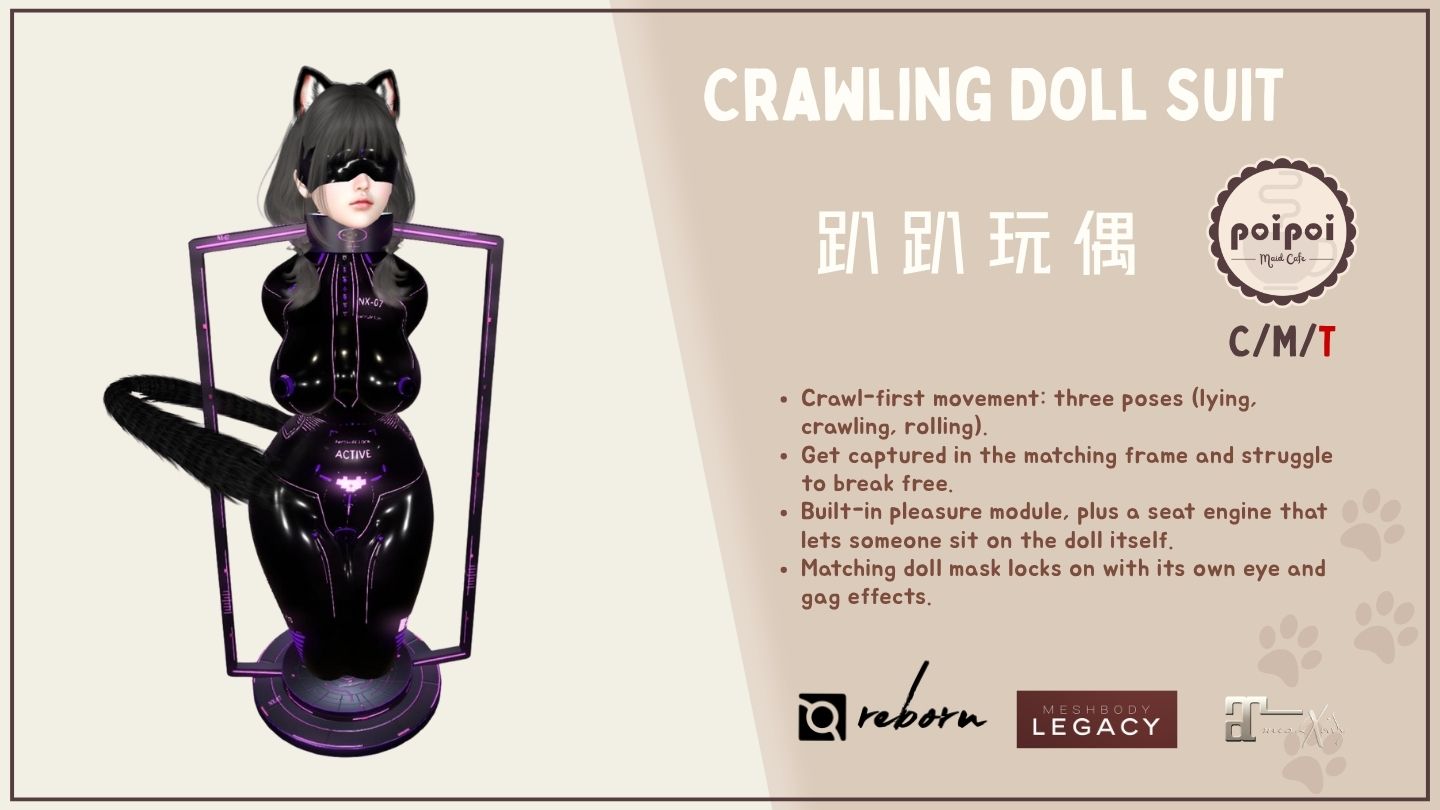
- Lockable Suit & Key System
- Seal the suit shut so it cannot be removed, hand exclusive unlock rights to a key holder, and layer Touch, Build, and Movement RLV restrictions on top while locked.
- Crawl-Focused Poses
- Cycle between lying, squirming, and rolling with your arms and legs wrapped behind you, inch along the ground with flight switched off, and let anyone with permission grab and drag you around like the doll you are.
- Pleasure Module
- Vibrate or piston output with four intensity levels, random mode, and Normal, Denial, Edge, and Tease programs driven by your PA2 arousal, plus a manual discipline shock.
- The Frame
- A matching capture furniture that only suit-wearers can be seated or trapped into, with a struggle-to-escape minigame, auto-trap and recapture, its own timer and RLV lock-down.
- Doll Mask
- A fully independent lockable face attachment with a three-level eye mask, a four-level gag with cheat mode, and communication restrictions while locked.
Changelogv1.0.01 update — tap to expand
1.0.0 · September 2026
- Initial release
How it works
Getting Started
- Right-click the suit in your inventory and choose Attach.
- Touch the suit to open the main menu.
- From the main menu you can lock the suit, start a timer, adjust the pleasure module, cycle poses, start the shared seat engine, change settings, and manage who has access.
- 🌐 中文 / EN at the end of the main menu switches the menu language at any time.
Locking, restrictions, hover height, and the latex appearance overlay rely on RLV (supported by viewers like Firestorm or Catznip). Without RLV support, those effects won't apply.
Lock & Key Holder
- 🔒 LOCK: the suit can no longer be removed. Anyone who can open the menu (owner, trusted user, or the wearer with Self Access on) can lock it.
- 🔓 UNLOCK: fully releases the suit, clearing every RLV restriction, drops the key holder, and cancels Self-Bondage. Unlocking is blocked while someone else holds the key or Self-Bondage is active; only the current key holder, the owner, or a trusted user can unlock in that case.
- 🗝 TAKE KEY: available once the suit is locked and no one else holds the key (and Self-Bondage isn't active). Taking the key makes you the sole person who can unlock the suit or grant Timer/Access-level actions.
- 🗝 RETURN KEY: only the current key holder sees this; it hands control back immediately.
- While Self-Bondage is active, the TAKE KEY button is hidden: nobody can take over the key mid-Self-Bondage. RETURN KEY is unaffected.
If your key holder disappears (logs off, etc.), the key stays assigned to them until they return it, or an owner/trusted user unlocks you, or you wait out a running Self-Bondage/Timer to get your own unlock right back.
Timer
Open ⏱ TIMER from the main menu. The wearer holding their own key (or a master/trusted/key-holder user) sees the full Timer menu; a stranger with Public Extend on sees a stripped-down add-time screen; anyone else is denied.
- DURATION: shown at the top. Add to it with +1MIN / +5MIN / +30MIN / +1HR, or clear it with ♻ RESET. Maximum duration is 30 days.
- MODE: a toggle button reading ☑ REAL TIME (ticking down by the wall clock, even while detached) or ☐ REAL TIME (Game Time: pauses while the suit isn't worn). Mode can only be changed while stopped.
- ▶ START: begins the countdown (needs a duration greater than 0).
- While running: ⏹ STOP, plus extend buttons for the wearer (while holding their own key) and for master/trusted/key-holder users.
- On completion: the suit fully unlocks and every RLV restriction clears automatically.
Public Extend
A toggle (☑/☐ PUBLIC EXTEND) visible to the wearer and master/trusted/key-holder users, off by default. When on, a stranger who opens ⏱ TIMER sees a simplified screen with only +1MIN / +10MIN / +30MIN / +1HR buttons. These only work on a timer that is already running, and share one 5-minute cooldown across every stranger.
Self-Bondage Timer
Shown as 🔒 SELF-BONDAGE, visible to the wearer only when the suit is unlocked or already locked with no key holder, the timer is stopped, and a duration is set.
- Pressing it locks the suit (if it wasn't already) and starts the countdown with no way to unlock early on your own.
- While active you see only your status, remaining time, and a Return option, with no Start/Stop/Reset or mode toggle.
- A master, trusted user, or key holder can still extend the timer, or press 🔓 RELEASE to end it early (a full unlock).
- When the timer runs out: Self-Bondage ends and the right to unlock is restored to you, but the suit stays locked; you must manually unlock it yourself.
Self-Bondage locks you in with no manual override until the timer ends or a key holder releases you early. You can extend it, but not stop it, on your own.
RLV Restrictions
Only visible on the main menu (⛓ RLV) while the suit is locked. Choose a group:
✋ TOUCH: TOUCH ALL (block all clicking), FAR (block clicking past 1.5m), WORLD (block clicking world objects), TOUCH SELF (block clicking your own attachments), GESTURE (block triggering gestures), 🧹 CLEAR ALL.
🧱 BUILD: INVENTORY (hide your inventory), EDIT (block building/editing), REZ (block rezzing from inventory), VIEW CONTENT (block viewing notecards/scripts/textures), 🧹 CLEAR ALL.
🚷 MOVEMENT: SIT (block sitting on objects), TELEPORT (block all teleport methods), UNSIT (block standing up), MAP (hide the world map), 🧹 CLEAR ALL.
Each toggle can be flipped whether or not the restriction is currently in force, but it only takes real effect while the suit is locked. Unlocking the suit always clears every RLV rule in all three groups automatically.
Two things apply whenever the suit is simply worn, independent of lock state: flying and running are blocked, and a full-body latex appearance overlay is applied automatically (and removed on detach).
Pleasure Module
Open 📳 PLEASURE from the main menu.
- Output type: 🔄 VIBRATE/PISTON switches between a vibrator and a piston (thrusting) effect. Only shown while the module is worn; switching applies immediately, even mid-run.
- Output level: - / + buttons cycle intensity 1 through 4.
- ▶ RUN / ⏹ STOP: starts or stops the effect.
- ☑/☐ RND (Random): when on, intensity randomly changes every 15–45 seconds while running.
- Mode cycle (🔄 button, cycles NORMAL → DENIAL → EDGE → TEASE → back to NORMAL):
- NORMAL: runs steadily at the set level.
- DENIAL: watches your arousal (via a PA2-compatible arousal meter, if you have one) and delivers a shock once it peaks, then keeps going.
- EDGE: automatically pauses output when arousal peaks, and resumes once it drops back down.
- TEASE: cycles on for 5–15 seconds and off for 20–60 seconds, automatically and unpredictably.
- 🔊 VOLUME: opens a submenu with - / + in five steps (0%, 20%, 40%, 60%, 80%, 100%).
- ☑/☐ MSG: turns the module's status chat messages on or off.
- ✖ REMOVE / ✔ WEAR: takes the module out or puts it back on. Removed, it stops running and the Run/Level/Random/Mode/Type buttons disappear, leaving only Volume, Msg, and Wear remain.
Access to the Pleasure module matches the main menu, except the wearer specifically loses control of it while the key is held away (a key holder is set, or Self-Bondage is active): the same window in which they can't unlock themselves.
DENIAL and EDGE react to a PA2-compatible arousal meter if you're wearing one. Without one, they behave like NORMAL mode.
Punishment
⚡ SHOCK on the main menu delivers a one-off discipline shock: an instant 5-second shock effect. It uses the same access rule as the Pleasure module and works whether or not the module is currently running or worn.
Binding & Poses
The 🔄 LIE / CRAWL / ROLL button on the main menu cycles through three poses, one press at a time. In all three, your arms and legs stay bound behind you:
- LIE: curled onto one side; only very limited wriggling movement.
- CRAWL: chest down, back arched, arms and legs wrapped behind you, inching along one small wriggle at a time like a worm.
- ROLL: pinned on one side; the only way to move forward is to roll.
Available to master/trusted/key-holder users at any time, or to the wearer when Self Access is on.
The suit's thrusting toy is animated on the Bento wing bones. If your avatar wears Bento wings (or anything else that animates those bones), they will fight the toy's animation, so the two are not compatible.
Ground Seat
- 🪑 SIT starts a transparent two-person animation engine and force-seats you on the spot. 🪑 STAND stops it. There is no seat object: the second person sits on the doll's body itself. Available to anyone who can open the main menu.
- Once the engine is running, a second person may sit on the doll voluntarily.
- The engine stops automatically if both spots aren't filled within 30 seconds, or if either person stands up.
- 🧍 POSITION appears on the main menu while the engine is running. It first asks whose position to adjust, 🤖 DOLL (you) or 🧍 SITTER (the second person), then opens a six-direction adjustment page:
- ◀ LEFT / ▶ RIGHT: side to side
- ▲ FWD / ▼ BACK: forward/back
- ⇧ UP / ⇩ DOWN: height
- 📐 STEP: cycles the adjustment increment: 0.25 → 0.05 → 0.01
- ♻ RESET ALL: clears that person's offsets back to the default seat position
Avatar Grabber
Touching the suit briefly opens the main menu, but touching-and-holding on the suit's main body panel for about half a second instead grabs the wearer: you can then drag them around by moving your view, and they're lifted slightly off the ground. Release to let go.
- Requires the same access as opening the main menu.
- Can be turned off entirely from Settings, in which case holding does nothing and only a quick tap opens the menu.
Settings
Open ⚙ SETTINGS from the main menu (available to the public if you aren't the wearer, or to the wearer while holding their own key).
- ▲ HOVER / ▼ HOVER: raises or lowers the suit's hover/float height, clamped between -2m and +2m. The increment is set by the ⇅ STEP button.
- ⇅ STEP: cycles the hover adjustment increment: 0.01 → 0.05 → 0.1 → 0.5 (default 0.05m).
- ☑/☐ GRABBER: turns the Avatar Grabber on or off. Turning it off immediately forces a release if someone is currently holding the wearer.
Access Control
Open 🔐 ACCESS from the main menu.
- 👤 OWNER+ / OWNER-: scans nearby avatars (10m) to assign or clear the Owner, who always has full control.
- ❤ TRUSTED+ / TRUSTED-: scan-adds a trusted user (up to 5), or removes one from a pick list.
- ☑/☐ SELF ACCESS: lets the wearer open their own menu and act without a key holder present. Cannot be turned off until an Owner is set.
- ☑/☐ PUBLIC ACCESS: lets strangers interact with the menu at all (subject to each feature's own access rules).
The Frame
The Frame ships bundled with the suit, and is also sold on its own for anyone who just wants the furniture. Either way, it's a piece of furniture you place on your land. It only accepts people who are wearing a Crawling Doll Suit: it checks automatically within a couple of seconds, and anyone else is stood back up with a rejection message. Its lock, timer, and RLV restrictions are entirely separate from the suit's own: unlocking the suit does not release you from the Frame, and vice versa.
Buying the Frame on its own? It's furniture only — whoever sits in it still needs to be wearing the Crawling Doll Suit.
Getting Seated
- Sit on it voluntarily: if you're wearing the suit, you're seated right away. If not, you'll be stood back up.
- Getting captured: an operator touches the Frame and taps 🎯 CAPTURE. It lists people within 20 m, and whoever is picked is force-seated (they still need to be wearing the suit).
- Auto-Trap: from ⚙ SETUP → 🕸 TRAP, turn on ☑ TRAP to automatically catch the first eligible person who walks close. Turn on ☑ RECAPTURE so that if a captive goes offline mid-session, the Frame holds their spot and seats them again once they're back nearby and wearing the suit (when off, the spot is cleared as soon as they drop). 🔄 WHITELIST / BLACKLIST / ALL cycles who gets caught: only whitelisted people, everyone except blacklisted people, or anyone.
Struggle & Escape
Once seated, escape by pressing A and D alternately: pressing the same key twice in a row doesn't count. Each valid alternation adds progress toward 100%, shown as floating text above the Frame.
- Progress drains away on its own if you stop struggling.
- Struggling for 50 seconds straight without escaping wears you out: your keys stop working for 5 seconds, with a red "EXHAUSTED" countdown.
- Reaching 100% plays a short success animation, then you're released automatically.
- ☑/☐ LOCK ESCAPE (main menu, while someone is seated) stops all progress: A/D still plays the struggle animation, but nothing is gained and existing progress keeps draining.
- After an escape or when the timer runs out, the Frame cools down briefly before it accepts anyone new.
Frame Main Menu
Touch the Frame to open its menu. The title shows STANDBY, TARGET: name, or RECAPTURING: name (waiting for a dropped captive to come back).
- 🎯 CAPTURE: pick a nearby person to seat (shown when the Frame is empty or waiting for someone to return).
- ☑/☐ LOCK ESCAPE and 🔓 RELEASE: shown while someone is seated. Release lets them go, or cancels the wait for a dropped captive.
- ⚙ SETUP: 🕸 TRAP, ☑/☐ HIDE STATUS, 🧍 POSITION, 📏 RESIZE, 🔐 ACCESS.
- ⏱ TIMER: the Frame's own countdown.
- ⛓ RLV: restrictions for whoever is seated.
- 🌐 中文 / EN: switches the menu language.
Notes on Setup:
- ☑/☐ HIDE STATUS: hides the floating text from the person seated (operators and bystanders still see it).
- 📏 RESIZE: changes the size of the whole Frame, from 0.01 m to 64 m, with ♻ RESTORE to go back to the original size.
Frame Timer
Separate from the suit's timer. ☑/☐ AUTO TIMER starts the countdown by itself as soon as someone is captured or seated. +1MIN / +5MIN / +30MIN / +1HR add time (24-hour maximum; you can only add, so use ♻ RESET to clear). 🔄 GAME TIME / REAL TIME chooses how it counts, and can only be changed while stopped: Game Time only runs while someone is seated and pauses if they go offline, while Real Time follows the real clock no matter what. ▶ START begins the countdown; while it runs you get +1MIN / +5MIN, ⏸ PAUSE, and ⏹ STOP. When time runs out, the person is released automatically and local chat gets a message.
Frame RLV Restrictions
Ten restrictions you can switch on or off one by one, each shown with ☑ (on) or ☐ (off). Enabled ones take effect as soon as someone is seated, and are re-applied regularly so they still hold after a relog:
- SITTING: can't stand up or teleport away from the seat
- FAR TOUCH: can't touch distant objects
- EDIT: can't edit objects
- TELEPORT: can't teleport, including landmarks and teleport invitations
- ALL TOUCH: can't touch anything
- INVENTORY: can't see their own inventory
- NAMES & TEXT: can't see other people's nametags, names, or hover text
- CHAT & GEST.: can't talk or use gestures and emotes
- IM: can't send or receive private messages
- LOCATION: can't see the world map, minimap, or where they are
Also: 🔄 CAM cycles the camera distance limit (Mouselook only → 1m → 2m → 5m → Off), ▶ APPLY NOW re-applies everything enabled, and 🧹 CLEAR ALL removes only the restrictions this Frame set (restrictions from other items the person is wearing are untouched). Everything is lifted automatically the moment the person is released.
Position Adjustment
Reached via 🧍 POSITION in Setup, or automatically when the seated person touches the Frame themselves:
- ◀ LEFT / ▶ RIGHT, ▲ FWD / ▼ BACK, ⇧ UP / ⇩ DOWN
- 📐 STEP changes how far each tap moves: 0.25 → 0.05 → 0.01
- ♻ RESET ALL goes back to the default position
- The seated person sees ✖ CLOSE instead of a Back button. Your adjustments are remembered by the Frame and are not reset by a release.
Access Control (Owner Only)
- 🔄 PUBLIC / OPS ONLY: chooses who can open the Frame's menu.
- In Operators Only mode: 👮 OP+ (pick someone nearby), 👮 OP- (remove from a list), 👮 CLEAR OPS. Up to 10 operators.
- Anyone wearing the suit can still sit on the Frame regardless of this setting: Access Control only gates the menu, not seating.
Doll Mask
The Doll Mask comes in the same package as the suit and the Frame. It has its own lock, key holder, timer, and access list, tracked separately from the suit and the Frame: nothing about wearing, locking, or releasing the Mask affects the suit, and vice versa.
Touching the Mask opens its own menu, with the same lock/key-holder layout as the suit: lock status and key holder at the top, then 🔒 LOCK / 🔓 UNLOCK, 🗝 TAKE KEY / RETURN KEY (locked only, same rules as the suit), ⏱ TIMER, 👁 EYE MASK, 💬 GAG, ⛓ RLV (locked only), 📏 RESIZER (module access), 🔐 ACCESS, and 🌐 中文 / EN. Lock, key holder, timer, and access all work exactly like the suit's own, tracked separately.
Eye Mask
Open 👁 EYE MASK from the Mask's menu.
- ☑/☐ WEAR: puts the eye portion on or takes it off. Taking it off immediately releases any vision effect; putting it back on restores your chosen level.
- Level (shown only while worn): OFF / 50% / 75% / OPAQUE: a radio choice of how dark your vision gets. Vision also gradually darkens with distance, going fully black past a fixed range regardless of level.
Gag
Open 💬 GAG from the Mask's menu.
- ☑/☐ WEAR: puts the gag portion on or takes it off. Taking it off restores normal speech immediately; putting it back on restores your chosen garble level.
- Level (shown only while worn): LIGHT / MODERATE / HEAVY / SILENT: how heavily your speech gets garbled to others.
- ☑/☐ CHEAT: reveals your original, ungarbled text alongside the garbled version.
- ☑/☐ CHEAT OWNER ONLY: when Cheat is on, restricts who sees the original text to the owner only (sent privately) instead of everyone nearby.
Communication Restrictions
Open ⛓ RLV from the Mask's menu (locked only). Four independent toggles: IM OUT (block sending IMs), IM IN (block receiving IMs), IM START (block starting IM sessions), CHAT (block public chat), plus 🧹 CLEAR ALL. Toggles can be flipped anytime but only take effect while the Mask is locked; unlocking clears them automatically.
Resizer
Open 📏 RESIZER from the Mask's menu (module access, same rule as Settings on the suit). Stretch the whole Mask or individual axis pairs, in 1%/5%/10% steps, then ✔ DONE. ♻ RESTORE reverts to the original size.