
Script Pack for Chastity Belts
Script-only: adds locking and orgasm control to your existing belt
This is script only: the chastity belt is not included. It's an upgrade for the belt you already own: link the pack in once, and any mod-permission belt becomes a fully featured POI device with vibration, orgasm control, shock discipline, a 30-day timer, key-holder access, and RLV enforcement (an RLV-enabled viewer such as Firestorm or Catznip is required for locking). Full English and Chinese menus, and it turns itself on every time you wear the belt, no ritual, no fuss.
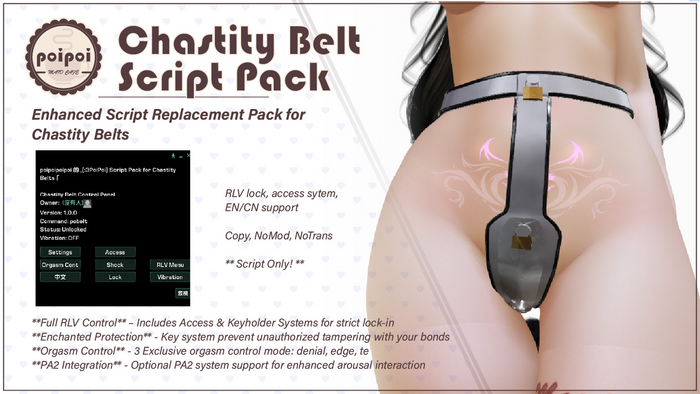
- Bring Your Own Belt
- A transparent script-only upgrade, not another belt to collect. Link it into the chastity belt you already love once: after that it wakes up automatically every time the belt goes on. Verified with most mod-permission belts; zero setup needed if you skip the extras.
- Vibration & Orgasm Control
- Three intensities plus a Random mode that keeps you guessing, with five-step volume. On top of that, four arousal modes: Normal, Denial (shocked and drained back down when you get too close), Edge (held right at the brink), and Tease (unpredictable on-and-off torment). Arousal modes require the PA2 plugin (Project Arousal 2).
- Lock, Keys & Weld
- Lock the belt and hand the keys to someone else: from then on, only the key holder decides. Or go further: Weld seals the belt permanently, with the wearer's informed consent, and only a Crystal of Deliverance can undo it.
- Discipline & Tamper Punishment
- A punishment button for the key holder, automatic shocks on unauthorized release attempts, and an optional spoken trigger phrase (public or key-holder-only). Every punishment is a five-second lesson in obedience.
- Timer, Self-Bondage & Public Extend
- Set a countdown up to 30 days and the belt unlocks itself when it expires. Hand your own key to the timer with Self-Bondage: no take-backs until it ends. Or open Public Extend and let anyone nearby pile on more time.
- Your Belt, Reshaped
- Tag parts of your belt mesh to appear or vanish with the lock state: a lock head that only exists while locked, a key slot that disappears once it's sealed. One-tap Hide All tucks everything away. Fine-tune every intensity and threshold in the Chastity.Config notecard.
Changelogv1.5.19 updates — tap to expand
1.5.1 · August 2026
- Removed a stale menu toggle
1.5.0 · August 2026
- Added a Hide All toggle to tuck away every extra prim in one tap
1.3.0/1.4.0 · August 2026
- Feature-parity updates bringing this pack in line with our other chastity belt line
1.2.0 · August 2026
- Added optional lock-state prim show/hide
1.1.0 · July 2026
- Added Self-Bondage, Weld, and a refreshed access-control system
1.0.4 · June 2026
- Fixed orgasm control bugs
1.0.3 · June 2026
- Fixed multiple logic and dialog bugs
1.0.2 · April 2026
- Fixed tease mode
1.0.1 · March 2026
- Fixed a bug in the timer module
How it works
Getting Started
A transparent script pack that turns any chastity-belt mesh into a full-featured locking device. Link it in once: it activates automatically every time you wear the belt.
Installing the Script Pack
The pack is invisible when worn, so it must be linked into a belt mesh before wearing. Two methods:
Method 1: Link on the ground
- Rez your chastity belt on the ground.
- Rez the script pack near it. The pack is transparent: press Ctrl+Shift+T if you can't see it.
- Click the script pack first, then Shift-click the belt (this makes the belt the root).
- Press Ctrl+L to link them.
- Right-click the linked object and choose Take.
Method 2: Copy contents into the belt
- Rez the script pack on the ground and right-click → Edit.
- In the Content tab, select all items and drag them into your inventory.
- Rez your belt, open its Content tab, and drag the copied items into it.
- Right-click the belt and choose Take.
First Wear
- Wear the combined belt and grant the requested permissions, it activates automatically.
- Touch the belt, or say your chat command, to open the main menu.
- Toggle language anytime with the 中文 / EN button at the top of the main menu.
Requires a belt with mod permission. Locking and the RLV menu require an RLV-enabled viewer (e.g. Firestorm, Catznip).
Lock & Key Holder
- Touch the belt (or use your chat command) and press Lock / Unlock from the main menu.
- Locked: the belt cannot be removed. Unlocked: it can.
- Take Keys: claim the keys, so only you (the key holder), the owner, or a trusted user can unlock. Return Keys: give them back.
- If the wearer tries to unlock without permission, the attempt is denied and can trigger a punishment.
Weld (Permanent Lock)
For a lock that cannot be undone through the menu:
- Open Settings → Weld (wearer or owner only).
- The wearer sees a confirmation naming the requester, the permanent-lock consequences, and the release location.
- The wearer presses Confirm. The belt is now welded: Lock/Unlock, Take/Return Keys, and Timer disappear from the menu, and any running timer is cleared.
- Only a Crystal of Deliverance safeword item can release a welded belt.
Vibration
Open Vibration from the main menu.
| Button | Effect |
|---|---|
Off |
Stop vibration |
Low / Mid / High |
Vibrate at that intensity, each with its own sound |
Random |
Cycles intensity automatically (every 20s by default) |
Volume ▸ |
Vol+ / Vol- in five steps, shown as a 5-block bar |
Orgasm Control
Open Orgasm Control. Requires the PA2 arousal plugin (Project Arousal 2) to be active on the wearer.
| Mode | Behavior |
|---|---|
Normal |
Vibration runs freely, no interference |
Denial |
When arousal crosses the threshold, triggers a shock and drains arousal back down (the belt starts in this mode) |
Edge |
Pauses vibration at the upper threshold, resumes at the lower |
Tease |
Randomly cycles vibration on/off for psychological teasing |
Press Help in this menu for an in-menu explanation of each mode.
Punishment
Open Punish from the main menu.
| Button | Action |
|---|---|
☑/☐ Tamper Punish |
Automatically punish unauthorized unlock/removal attempts |
Punish |
Trigger a punishment immediately |
☑/☐ Command |
Let a spoken phrase trigger punishment |
☑/☐ Public Command |
Let anyone nearby speak the phrase (off = only owner / key holder / trusted) |
Set Command |
Change the trigger phrase (default PUNISH!) |
A punishment plays a warning sound, then ~5 seconds of shock sound, shock animation, and a temporary black-screen effect on the wearer (RLV viewer required).
Timer
Open Timer (hidden once welded).
- Start / Stop the countdown; adjust with +1min / +5min / +30min / +1hr / Reset while stopped.
- Maximum duration is 30 days. When it finishes, the belt unlocks automatically.
- While running, the owner, key holder, or a trusted user can add time directly from this menu.
- ☑/☐ Public Extend: lets any nearby user add time to a running timer (with a shared cooldown between adds).
Self-Bondage Timer
Self-Bondage lives in the Timer menu: the wearer gives up their own ability to unlock until the timer ends, even to themselves.
- Available only to the wearer, only while the timer is stopped and no key holder is set.
- Once started, only the owner, key holder, or a trusted user can end it early with the Release button; otherwise it runs out with the clock.
Neither an active self-bondage nor a welded belt can be undone through the menu: only a Crystal of Deliverance safeword item releases them.
RLV Restrictions
Open RLV Menu to add optional restraints beyond the belt's own lock (requires an RLV-enabled viewer).
| Toggle | Effect |
|---|---|
Touch All |
Block all touch interactions |
Far Touch |
Block touching distant objects |
Touch HUD |
Block touching HUD attachments |
Touch Self |
Block touching your own attachments |
Edit |
Block editing objects |
Rez |
Block rezzing objects |
Wear |
Block wearing new items |
Inventory |
Hide inventory access |
Clear All removes every restriction from this menu at once. All of them are also cleared automatically on unlock.
Access Control
Open Access from the main menu. Hierarchy: Owner → Self → Trusted (up to 5) → Public.
| Button | Action |
|---|---|
Owner+ / Owner- |
Add / remove the owner |
Trusted+ / Trusted- |
Add / remove a trusted user (up to 5) |
☑/☐ Self Access |
Allow / deny the wearer their own control |
☑/☐ Public Access |
Allow / restrict control by anyone nearby |
Removing the owner re-enables self access automatically.
Settings
Open Settings from the main menu.
| Option | Effect |
|---|---|
☑/☐ Message |
Show / hide status messages (vibration, orgasm, timer, …) |
☑/☐ Hide All |
Hide / show every prim on the belt at once (tag a prim nohide to spare it) |
Weld / ☑ Welded |
Request a permanent lock, or view weld status (wearer/owner only) |
Reset Stats |
Reset the worn-time, days-without-orgasm, and shock counters |
Lock-State Show/Hide (optional, mesh customization)
Tag prims of your belt to appear or vanish with the lock state. While the belt is on the ground, enable Edit linked parts (Ctrl+Alt+T), select a prim, and set its Description field to:
| Tag | Effect |
|---|---|
hide |
Hidden by default, shown while locked (e.g. a lock head) |
show |
Shown by default, hidden while locked (e.g. a key-slot cover) |
Take the belt back and re-wear it for tags to apply. Skip entirely if your mesh doesn't need it: the system does nothing until a prim is tagged.
Chastity.Config notecard
Edit this notecard inside the belt to change vibration, denial, edge, and tease behavior. Out-of-range values are rejected and the belt keeps its previous setting.
| Parameter | Range | Default | Meaning |
|---|---|---|---|
config_denial_threshold |
0.0–1.0 | 0.8 | Arousal level that triggers Denial |
config_denial_arousal_value |
-200 to -1 | -100.0 | Arousal drained during Denial |
config_vib_arousal_low |
0–200 | 25.0 | Arousal generated per tick at Low |
config_vib_arousal_mid |
0–200 | 50.0 | Arousal generated per tick at Mid |
config_vib_arousal_high |
0–200 | 100.0 | Arousal generated per tick at High |
config_vib_random_interval |
1–3600s | 20.0 | How often Random switches intensity |
config_edge_threshold_lower |
0.0–1.0 | 0.2 | Edge resume threshold |
config_edge_threshold_upper |
0.0–1.0 | 0.8 | Edge pause threshold |
config_tease_min_on_duration |
1–3600s | 5.0 | Tease minimum vibration-on time |
config_tease_max_on_duration |
1–3600s | 10.0 | Tease maximum vibration-on time |
config_tease_min_off_duration |
1–3600s | 30.0 | Tease minimum vibration-off time |
config_tease_max_off_duration |
1–3600s | 60.0 | Tease maximum vibration-off time |
What persists across relog: lock state, key holder, weld status, timer, access settings, and stats (worn time, days without orgasm, shocks). Only a script reset clears them.