
The Carry Cage
Wearable cage: locks in place, carried off by the owner
A wearable cage that locks you in place and lets a trusted dominant pick you up and carry you wherever they please. Once locked, you cannot walk, turn, or jump: the bars appear around you, and anyone with access can scoop you up by hand and stroll off at walking speed.
Under the hood it's a full restraint tool: a key system that hands exclusive unlock control to whoever takes the keys, owner/trust/public access tiers, live seat adjustment for both prisoner and carrier, RLV restrictions that survive relogs, an attachment-stripping Unwear menu, and a fully bilingual interface you can flip between English and 中文 at any time.
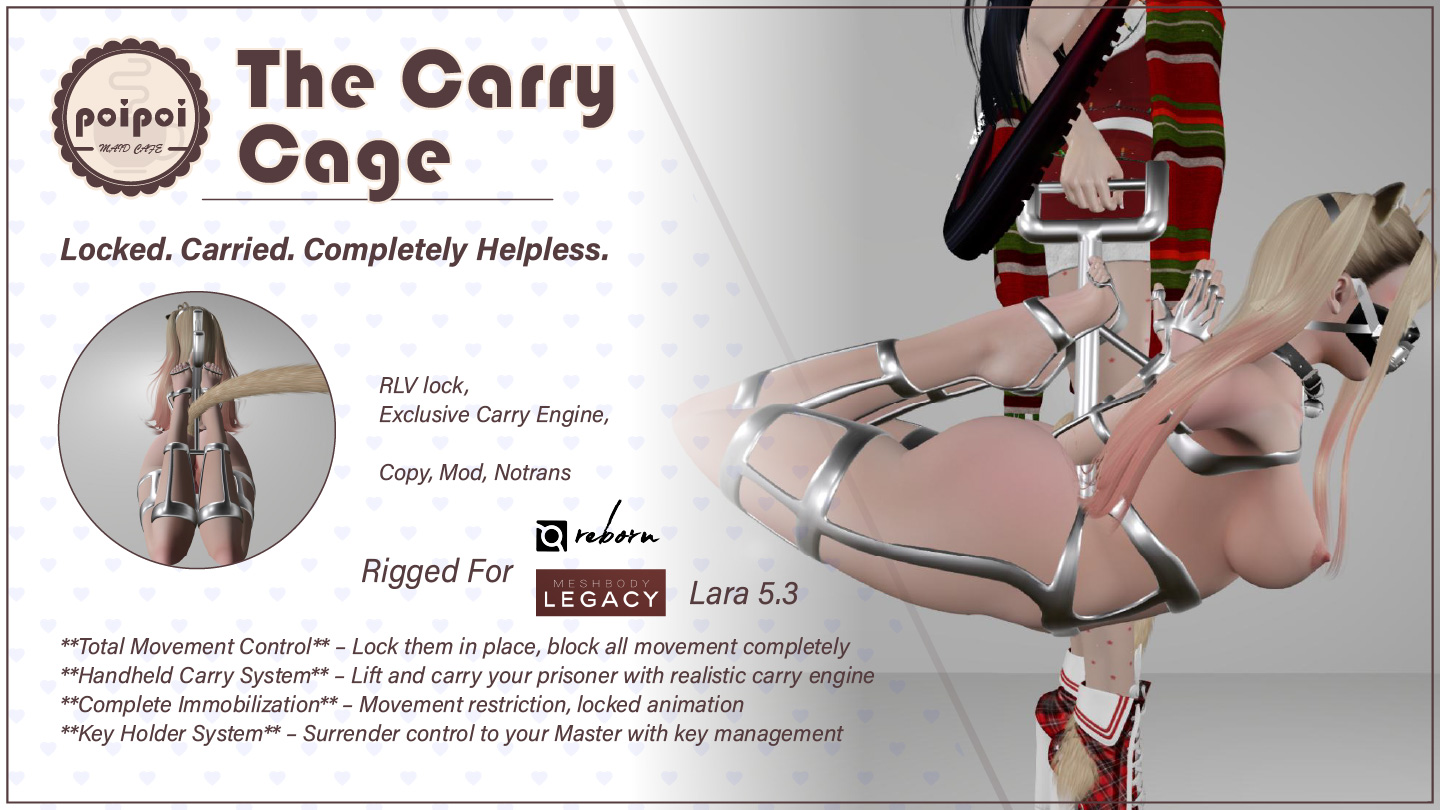
- Locked in Place
- One press of Lock and the cage bars appear around you: no walking, no turning, no jumping, no flying. The lock survives relogs and re-attaching, and everything is restored automatically when you come back.
- Handheld Carry
- Once you're locked, an authorized dominant picks you up and carries you by hand at natural walking speed: smooth WASD control, turning in place, jumps, and a follow camera. Their walk, your cage, wherever they please. Or press and hold the cage to grab you and drag you around.
- Lock & Keys
- Take the keys while the cage is locked and you become the sole key holder: from that moment, unlock is yours alone to allow. Return them any time; unlocking always clears the holder.
- Access Control
- One owner, up to five trusted dominants, self access, and public access, each set from the Access menu. Self access can only be switched off once an owner claims the cage, and the owner can add an Access Lock that keeps the wearer out of the menu.
- RLV Restrictions
- Locking automatically makes the cage unremovable and blocks unsit and far touch, plus optional teleport, touch, edit, inventory, and outfit restrictions that persist until cleared. The Unwear menu can strip attachments one by one.
- Fine Position Adjust
- Both seats (prisoner and carrier) adjust along six axes in steps from 0.01 to 0.15 m, live while being carried, saved for the next pickup, preserved across relogs.
Changelogv1.3.04 updates — tap to expand
1.3.0
- Added grab and drag: press and hold the locked cage to drag the wearer around; a short click still opens the menu
- Added a GRABBER toggle in Settings to turn grab and drag on or off
- Pick Up is now refused while the wearer is being grabbed
- Added Access Lock: the owner can stop the wearer from opening the Access menu
- The owner and trusted users can now always unlock, even while someone else holds the keys
- The owner and trusted list are now kept through a script reset
- Owner and Trusted+ now pick from avatars within 10 m (up to 10, yourself included)
- Added a step size to the float height setting
- Redesigned menus with icons, capitalized button labels, and a consistent BACK button
- Cage messages now appear as emotes without the object name
1.1.2 · January 2026
- Stability and position-offset fixes
1.1.0
- Carrier gender customization
1.0.0
- Initial release
How it works
Getting Started
- Wear the cage: in your inventory, right-click → Attach.
- Open the menu: touch the cage, or say the menu command in public chat (channel 0) or on channel 1.
- Format:
[first two letters of wearer name]cage(case insensitive) - Example: wearer JaneDoe Resident → type
jacage
- Format:
- The command is announced in local chat on first wear and every re-attach. Cage messages appear as emotes, without the object name.
Lock, carry restrictions, and RLV features require an RLV-enabled viewer (e.g. Firestorm, Catznip). The menus themselves work without RLV.
Lock & Key Holder
Lock:
- All movement is blocked: no walking, turning, jumping, or flying.
- The cage bars become visible; they hide again the moment you unlock.
- A lock sound plays and the wearer's animation changes to the cage pose.
- The cage stays locked after relogging or re-attaching; restrictions are re-applied automatically.
Unlock:
- Movement is restored, the bars hide, the pose stops, and an unlock sound plays.
- If the wearer is being carried, they are put down automatically.
- The wearer is forced to stand up if seated.
- The wearer cannot unlock themselves while being carried ("You cannot unlock while being carried.").
Keys (while locked):
🗝 TAKE KEYS: the first authorized user to take the keys becomes the key holder; only one at a time ("Key has already taken by ...").🗝 RETURN KEYS: the key holder can give the keys back at any time.- While a key holder is set, only the key holder, the owner, and trusted users can unlock. This holds even when the owner is the key holder. Everyone else is refused with "Access Denied".
- Unlocking always clears the key holder.
Handheld Carry
Once the cage is locked, an authorized user can use 📦 PICK UP:
- The cage must be locked first ("Device must be locked before picking up.").
- The wearer cannot pick themselves up ("You cannot pick up yourself.").
- Only one person can carry at a time ("Already being picked up by someone else.").
- A transparent Carry Engine box is rezzed. The wearer is seated on it automatically; the carrier is asked to sit on it too and has 30 seconds before the box disappears.
- While waiting, the box is semi-transparent with floating text "CLICK ME / 点这儿提人"; the carrier clicks it to sit.
- Once both are seated, the box turns invisible and the carrier chooses an animation style: Male or Female (defaults to Male after 30 seconds).
- The carrier controls movement with WASD / arrow keys: forward and backward at natural walking speed, smooth turning including in place, and E / Page Up to jump (1-second cooldown). A follow camera keeps the view natural.
- The carrier's stand/walk animations match the chosen style.
- Carrying ends automatically if either avatar stands up ("Handheld mode ended."). Only the current controller can use
📦 PUT DOWN, and unlocking the cage also puts the wearer down.
Grab and drag
While the cage is locked, press and hold the cage for about half a second to grab the wearer, then drag to move them around. Let go to drop them.
- A short click still opens the menu.
- Anyone allowed to use the cage can grab: the owner, trusted users, anyone if Public Access is on, and the wearer if Self Access is on.
- The wearer's movement lock is lifted while grabbed so the drag is smooth, and re-applied on release.
- A grab ends if the drag is interrupted, and relogging always releases it.
- Grab and Pick Up never run together: a grab is refused while the wearer is being carried, and
📦 PICK UPis refused while grabbed ("Cannot pick up while being grabbed."). - Turn it off or on with
☑ GRABBER/☐ GRABBERin the Settings menu.
Adjustments
Main menu (while being carried) → 📏 POSITION ADJUST → choose Prisoner (the wearer's seat) or Dom (the carrier's seat).
| Button | Function |
|---|---|
⬆ FORWARD / ⬇ BACK / ⬅ LEFT / ➡ RIGHT / ▲ UP / ▼ DOWN |
Moves that seat by one step along that axis |
⇅ STEP 0.01 / 0.05 / 0.15 |
Cycles the step size (0.01 → 0.05 → 0.15 → 0.01) |
🔄 RESET |
Restores that seat's default offset |
↩ BACK |
Back to the previous menu |
- While being carried, changes apply live ("Prisoner position adjusted: up").
- While not being carried, adjustments are stored and applied on the next pickup ("Dom position adjusted: up (will apply on next pickup)").
- Adjustments are preserved across relogs and re-attaching.
Access Control
Access menu (🔐 ACCESS). Hierarchy: Owner → Trusted (max 5) → Public.
| Button | Action |
|---|---|
👤 OWNER+ / 👤 OWNER- |
Set the owner (picks from up to 10 avatars within 10 m, yourself included) or remove the owner |
❤ TRUSTED+ / ❤ TRUSTED- |
Add/remove a trusted dominant (max 5) |
☑ SELF ACCESS / ☐ SELF ACCESS |
Wearer's own control on/off (disabling requires an owner set first) |
☑ PUBLIC ACCESS / ☐ PUBLIC ACCESS |
Allow anyone to use the cage (on by default) |
☑ ACCESS LOCK / ☐ ACCESS LOCK |
Owner only; while on, the wearer cannot open the Access menu |
↩ BACK |
Back to the main menu |
- The owner always has full control; trusted users (max 5) can lock, unlock, carry, and grab.
- Only the owner, and the wearer while Self Access is on, can open the Access menu; everyone else sees "Access Denied". While Access Lock is on, the wearer is refused too, and anyone but the owner toggling it gets "ERR: MASTER ONLY".
- Setting someone as owner also removes them from the trust list; removing the owner re-enables Self Access and clears Access Lock.
- Owner and trusted list survive a script reset; Self Access, Public Access and Access Lock do not.
Settings
Settings menu (⚙ SETTINGS):
- Float Height: raises or lowers the wearer while locked, from -2.00 m to +2.00 m, default -0.3 m.
▲ FLOAT/▼ FLOAT: raise or lower by one step⇅ STEP: cycles the step size (0.01 → 0.05 → 0.1 → 0.01 m)- Applies immediately while locked; the current value is reported after each change.
☑ GRABBER/☐ GRABBER: turns grab and drag on or off (on by default). Turning it off also releases anyone currently grabbed.
There is no configuration notecard; every setting is made through the menus. A lock sound plays when the cage locks, an unlock sound plays when it unlocks, and grab start and end each play a sound. The interface is fully bilingual: 🌐 中文 / 🌐 EN in the main menu switches all menus and messages between English and Chinese at any time, including the Carry Engine box messages.
RLV Restrictions
An RLV-capable viewer is required. While locked, the cage automatically applies:
| Restriction | Effect |
|---|---|
@detach=n |
The cage cannot be removed while locked |
@unsit=n |
The wearer cannot stand up on their own while seated |
@fartouch=n |
The wearer cannot touch distant objects |
Unlocking removes these automatically. Optional restrictions (main menu → ⛓ RLV, each toggle shows ☑ restricted / ☐ not restricted, press to flip) survive relogging until cleared:
| Button | Restriction applied |
|---|---|
TELEPORT |
Blocks all teleports: local, landmarks, offers from others, sit-teleports, and flying |
TOUCH ALL |
Blocks all touching |
FAR TOUCH |
Blocks touching objects beyond normal reach |
TOUCH WORLD |
Blocks touching world objects |
EDIT |
Blocks editing objects |
INVENTORY |
Hides the inventory |
OUTFIT |
Blocks adding/removing clothing |
✅ APPLY ALL |
Applies every restriction above |
🧹 CLEAR ALL |
Clears all RLV restrictions ("All RLV restrictions cleared.") |
↩ BACK |
Back to the main menu |
Escape & Release
Unwear menu (✖ UNWEAR): lists every attachment the wearer is currently wearing. Choosing one removes it via RLV. The menu refreshes after each removal, so several items can be removed one after another. ↩ BACK goes back to the main menu.
Unwear uses RLV to strip attachments: it only works on viewers with RLV enabled, and it removes items for real. There is no undo.